Category: SQL

Service Broker enabled by default while creating a database through T-SQL in SQL Server

Recently, we decided to disable Service Broker for all databases as part of our deployment. While doing a preliminary check, we observed that when we create a database through T-SQL, by default, the database is enabled with Service Broker.

Please find the below code to replicate the case.

Script:

IF NOT EXISTS(SELECT * FROM sys.databases WHERE [name] = 'testdb')
BEGIN
CREATE DATABASE testdb
Select 'Database created...'
END
GO
select is_broker_enabled,name from sys.databases where name = 'testdb'
GO
Drop database if exists  testdb
Select 'Database dropped...'

screenshot:

We also observed that while creating a database through SSMS interface/wizard, the service broker is disabled by default. Out of curiosity, SQL profiler has been set up, captured the statements and identified that when we create a database through SSMS interface, there is an explicit execution of disabling the Service Broker is happening followed by create database statement as below in the screenshot.

Conclusion:

Always DISABLE service broker explicitly ONLY if you do not really need it to be enabled on your database. Please note, there is no overhead when service broker is enabled but not used. On the flip side, disabling service broker can prevent the applications from using the feature of queuing and usage of components like SqlDependency/QueryNotifications that rely on it. Please never try to turn off service broker on your system databases like msdb as it can cause break in functionalities like database mail etc.

I’d like to grow my readership. If you enjoyed this blog post, please share it with your friends!

Fun with SQL – Find out numbers where adjacent digit differs by 1

Today, I have come through a post by one of my good friends and one of the most famous SQL Server experts in India – Madhivanan.

The question was : “Given a number N, write a code to print all positive numbers less than N in which all adjacent digits differ by 1” Here is my attempt to solve this using SQL Server T-SQL
--Provide input value 
declare @number int
set @number=105
 
--Create a temporary table to store numbers
Drop table if exists #temp
create table #temp (number int)

;with ctebuilder as(
select
    row_number () over (order by (select null)) as sno 
from
    sys.sysobjects as t1 cross join sys.sysobjects as t2 ) 
Insert into #temp(number) Select sno From ctebuilder where sno<=@number

;with cte as(
select
    t1.number number, 
    cast(substring(cast(t1.number as varchar(20)),t2.number,1) as int) as number2, 
	row_number () over(partition by t1.number order by (select null) asc) Rn
from #temp as t1 cross join #temp as t2
where t2.number <= len(t1.number) and t1.number <=@number
)
Select number From(
 Select * ,LAG(number2,1) OVER (partition by number
		ORDER BY (select NULL) asc
	) previous_val From cte
	) A group by number 
having count(case when previous_Val - number2 in (1,-1) then 1 Else NULL End )  
= count(number2)-1

I’d like to grow my readership. If you enjoyed this blog post, please share it with your friends!

Database Properties – Difference between GUI and sys.master_files in SQL Server

Few days back, One of my colleagues was asking why there is a discrepancy in GUI and system table for Database Properties -> File wizard. Here is an example similar to what he showed me.

GUI Screenshot

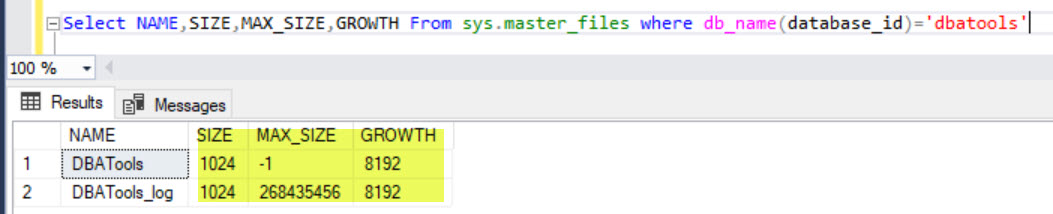
SSMS Query Screenshot

My first response was GUI is a user friendly and Query results is a SQL Server Professional friendly. There will be lots of differences like this between GUI and actual table how it saved.But, those are neither discrepancies nor defects, that is how it is by design.

To know this difference, sys.master_files is a system catalog view that represents properties of each file of your database ( data and log). size is always representing in 8 KB pages. Refer the link for more details for other properties.

So, to make him understand, I changed his query a bit to get both looks equal as below.

Select A.name [Logical Name], A.type_desc [File Type], ISNULL(B.Name, 'Not Applicable') 'Filegroup',
(size*8)/1024 [Size (MB)],
'By ' + Cast((growth*8)/1024 as varchar(max)) + 'MB, ' + 
Case when max_size = -1 then 'Unlimited' Else Cast(Max_size as varchar(max)) End + ' MB' [AutoGrowth/MaxSize],
substring(physical_name,0, Len(Physical_name)-charindex('\',reverse(Physical_name),0)+1) [Path],
Right(physical_name,charindex('\',reverse(Physical_name),0)-1) [File Name]
From sys.master_files A
Left Join sys.filegroups B on A.data_space_id = B.data_space_id
where db_name(database_id) = 'DBATools'

I’d like to grow my readership. If you enjoyed this blog post, please share it with your friends!

Amazon RDS for SQL Server versus SQL Server On Amazon EC2

Its an era of Cloud computing and anywhere you go, people talk about cloud computing and its usages, migration and benefits etc.So, I thought of taking an initiative on understanding how SQL Server is versed with Cloud. I would like to admit the fact that it was a “walk away” for me initially, but its quite interesting and fascinated knowing more about. Not just because its success stories,but also I loved the challenges while assessing different scenarios SQL Server with Cloud computing and its support.

This blog post concentrates on AWS and SQL Server.

Let us quickly understand what is AWS first?

AWS is a cloud computing platform provided by Amazon. It includes Infrastructure as a Service (IaaS), Platform as a service (PaaS) and Software As a Service (SaaS). Its a “pay-as-you-go” computing model that means you can scale your depending on your needs and pay for the service. Again, I do not want to go in detail about AWS since lots of resources available in internet and its just a google search away.

AWS offers a great flexibility to run SQL server with two major options:

1. Amazon Elastic Compute Cloud (EC2)
EC2 is a version of VM in Amazon cloud platform. It provides us a complete control for settings/configuration etc.
2. Amazon Relational Database Service (RDS)
RDS is a fully managed service without much control to the user. Service would take care of maintenance and manageability of service instances. Amazon RDS supports various relational database engines like MySQL, PostgresSQL, MS SQL, Oracle , MongoDB, Maria DB and Amazon Aurora etc.
Amazon Relational Database Service provides many more managed services compared to EC2 as shown in the below picture. Hence, its is more of business drivers that the customer can spend more effort on their data rather than maintenance and manageability of their database or instance.

Features supported by RDS & EC2

Now, its very important for SQL Server Professionals that to understand the supporting features for Amazon RDS and Amazon EC2. A quick reference table is prepared as below (as on 25th Apr 2020). We need to understand this reference may or may not needs changes as Amazon increases its capabilities in future and we may need to compare with the latest at the time.

SQL Server Features Amazon RDS for SQL Server SQL Server on Amazon EC2
Versions Supported SQL 2012/2014/2016/2017 ALL
Editions Supported Express/Wb/Standard/Enterprise
High Availability AWS Managed Self Managed
Encryption TDE , Encrypted Storage
Authentication Windows & SQL
Backups Managed Customized
Maintenance Automatic Self Managed
Monitoring & Management Amazon CloudWatch
CDC Available

The above are the major comparison chart, more detailed information, please refer See Also section.

Assessment & Planning

Since we had seen some of the differences between Amazon RDS & Amazon EC2 services, it is time for us to evaluate which one would be best suited for our application if there is a migration plan exists. We all should be aware the fact that it is NOT definitely a LIFT and SHIFT technique, but needs lots of understanding of your system and careful evaluation of certain things. This is the most time taken phase. I would like to list out few parameters to help in this decision making as below. Please note, it is a very wide topic and we should do a careful evaluation depending on your application/project workloads and other characteristics. I would also suggest to have an evaluation done by an Amazon professional for smooth transition.

1. Conduct an inventory of your SQL Server instances
2. Conduct an inventory of your SQL Server databases
3. Know your current Licensing option
One of the main reasons for cloud migration is cost saving. It can be in terms of Infrastructure cost or human resource cost or maintenance cost etc. License Cost can also be reviewed here as AWS comes with License option by default, so it would be important to verify the current licensing option with your organization and Microsoft that can be further evaluated. “Amazon RDS for SQL Server supports the “License Included” licensing model. You do not need separately purchased Microsoft SQL Server licenses. “License Included” pricing is inclusive of software, underlying hardware resources, and Amazon RDS management capabilities.” Please refer for more details.
4. Understand your HA/DR solutions
5. Performance benchmarks if any /Capacity Planning
(Resource utilization like CPU/Memory/IOPS etc)

6. Data Retention Policy if any
This assessment helps us to reduce the Disk cost and utilization. Say, If we have a database with 10 years of data and as per business rules, we just need ONLY last 5 years data , then it is good to purge or archive the older data before we migrate to AWS. This would reduce the space usage and enables an easy migration from On-Premise to Cloud. This is one of the area where Micorsoft Azure has flexibility using Stretch database feature; Amazon RDS does not support Stretch Databases yet (as on published date of this blog post).
7. Various Migration options

We will cover lot more interesting things in upcoming posts, until then stay tuned, stay safe!

See Also:

https://docs.aws.amazon.com/AmazonRDS/latest/UserGuide/CHAP_SQLServer.html

I’d like to grow my readership. If you enjoyed this blog post, please share it with your friends!

SQL Server Inventory Queries – SQL Server Databases

Here is a T-SQL script used for inventory purpose on your SQL Server Databases.

Tested in: SQL Server 2016/SQL Server 2017

Script:

drop table if exists #SQLDatabaseInventory;
create table #SQLDatabaseInventory(
  ServerName varchar(128) default @@servername
, database_id bigint
, DBName varchar(128) default db_name()
, DBOwner varchar(128)
, CreateDate datetime2
, RecoveryModel varchar(12) 
, StateDesc varchar(60)
, CompatibilityLevel int
, DataFileSizeMB int
, LogFileSizeMB int
, DataUsageMB int
, IndexUsageMB int
, SizeMB decimal(17,2)
, Collation varchar(60)
, UserCount int
, RoleCount int
, TableCount int
, SPCount int
, UDFCount int
, ViewCount int
, DMLTriggerCount int
, IsCaseSensitive bit
, IsTrustWorthy bit
, LastFullBackupDate datetime2
, LastDiffBackupDate datetime2
, LastLogBackupDate datetime2
, IsTracked sql_variant);

insert into #SQLDatabaseInventory(database_id,DBName, DBOwner, CreateDate, RecoveryModel, StateDesc, CompatibilityLevel, IsCaseSensitive
, IsTrustWorthy, Collation, LastFullBackupDate, LastDiffBackupDate, LastLogBackupDate, IsTracked)
select database_id,name, suser_sname(owner_sid), create_date, recovery_model_desc, state_desc,compatibility_level
, IsCaseSensitive=CAST(CHARINDEX(N'_CS_', collation_name) AS bit), is_trustworthy_on, Collation_Name
, t.LastFullBackup, t.LastDiffBackup, t.LastLogBackup
, Case when is_cdc_enabled = 1 Then 'CDC' else '' End 
from master.sys.databases db
outer apply( SELECT
MAX(CASE WHEN b.type = 'D' THEN b.backup_finish_date END) AS LastFullBackup,
MAX(CASE WHEN b.type = 'I' THEN b.backup_finish_date END) AS LastDiffBackup,
MAX(CASE WHEN b.type = 'L' THEN b.backup_finish_date END) AS LastLogBackup
FROM msdb.dbo.backupset b 
where b.database_name = db.name
) t;

EXEC master.dbo.sp_msforeachdb'use [?]
update t set SizeMB=(select sum(size)/128. from dbo.sysfiles)
, DataUsageMB=x.DataUsageMB, IndexUsageMB=x.IndexUsageMB
   , DataFileSizeMB = u.DBSize, LogFileSizeMB = u.LogSize 
   , TableCount=y.TC, UDFCount=y.UC, SPCount = y.SC, ViewCount=y.VC
   , DMLTriggerCount=y.DC
   , UserCount = z.UC, RoleCount = z.RC
from #SQLDatabaseInventory t
   outer apply (
   SELECT SUM(case when df.type in (0,2,4) then df.size else 0 end)/128
   , SUM(case when df.type in (1,3) then df.size else 0 end)/128 
   FROM sys.database_files df 
   ) u(DBSize, LogSize)
   outer apply(select  DataUsageMB=sum(
    CASE
    When it.internal_type IN (202,204,207,211,212,213,214,215,216,221,222,236) Then 0
    When a.type <> 1 and p.index_id < 2 Then a.used_pages
    When p.index_id < 2 Then a.data_pages
    Else 0
    END)/128,
IndexUsageMB=(sum(a.used_pages)-sum(
    CASE
    When it.internal_type IN (202,204,207,211,212,213,214,215,216,221,222,236) Then 0
    When a.type < > 1 and p.index_id < 2 Then a.used_pages
    When p.index_id < 2 Then a.data_pages
    Else 0
    END
    ))/128
    from sys.partitions p join sys.allocation_units a on p.partition_id = a.container_id
    left join sys.internal_tables it on p.object_id = it.object_id
   ) x
   outer apply 
   ( select SC=Sum(case Type when ''P'' then 1 else 0 end)
    , DC=Sum(case Type when ''TR'' then 1 else 0 end)
    , TC=Sum(case Type when ''U'' then 1 end)
    , UC= sum(case when Type in (''TF'', ''IF'', ''FN'') then 1 else 0 end)
    , VC=Sum(case Type when ''V'' then 1 else 0 end)
    from sys.objects where object_id > 1024
    and type in (''U'',''P'',''TR'',''V'',''TF'',''IF'',''FN'')
   ) y
   outer apply 
   ( select UC = sum(case when [Type] in (''G'',''S'',''U'') then 1 else 0 end)
      , RC = sum(case when Type = ''R'' then 1 else 0 end)
      from sys.database_principals
      where principal_id > 4
   ) z where t.DBName=db_name();
'
SELECT A.*,
Case when is_parameterization_forced = 1 then 'ON' ELSE 'OFF' END is_parameterization_forced,
Case when is_query_store_on = 1 Then 'ON' ELSE 'OFF' End is_query_store_on,
Case When is_broker_enabled = 1 Then 'ON' ELSE 'OFF' End is_broker_enabled,log_reuse_wait_desc,
Case when is_read_only = 1 Then 'READ-ONLY' Else 'ALL' End is_read_only,
Case When is_auto_close_on = 1 Then 'Enabled' Else 'Disabled' End is_auto_close_on,
Case When is_auto_shrink_on = 1 Then 'Enabled' Else 'Disabled' End is_auto_shrink_on,
Case When is_auto_update_stats_on  = 1 Then 'Enabled' Else 'Disabed' End is_auto_update_stats_on
FROM #SQLDatabaseInventory A
inner join sys.databases B
On B.database_id = A.database_id

I would really love to hear from you what else you would like to see to this list?

See Also:

https://sqlzealots.com/2020/04/26/sql-server-inventory-queries-sql-server-instances/

I’d like to grow my readership. If you enjoyed this blog post, please share it with your friends!