Category: SCRIPT GALLERY

How to get Disk space information in SQL Server

Problem Statement:

While troubleshooting an issue in SQL Server, I wanted to know the space information of the server. Since we did not have access to the server, we have come up with a simple script as below. I am sharing the script here hoping this helps you in similar situation.

Script:

declare @svrName varchar(255)
declare @sql varchar(400)
--User Options(By default Server name)
set @svrName = Cast(SERVERPROPERTY('MachineName') as varchar(255))
set @sql = 'powershell.exe -c "Get-WmiObject -ComputerName ' + QUOTENAME(@svrName,'''') 
	+ ' -Class Win32_Volume -Filter ''DriveType = 3'' '+
	'| select name,capacity,freespace |foreach{$_.name+''|''+$_.capacity/1048576+''%''+$_.freespace/1048576+''*''}"'

--creating a temporary table
CREATE TABLE #Details
(line varchar(255))
--inserting disk name, total space and free space value in to temporary table
insert #Details
EXEC xp_cmdshell @sql

--Retrieve the Capacity values in GB from PS Script Details
select rtrim(ltrim(SUBSTRING(line,1,CHARINDEX('|',line) -1))) as drivename
      ,round(cast(rtrim(ltrim(SUBSTRING(line,CHARINDEX('|',line)+1,
      (CHARINDEX('%',line) -1)-CHARINDEX('|',line)) )) as Float)/1024,0) as 'capacity(GB)'
      ,round(cast(rtrim(ltrim(SUBSTRING(line,CHARINDEX('%',line)+1,
      (CHARINDEX('*',line) -1)-CHARINDEX('%',line)) )) as Float) /1024 ,0)as 'freespace(GB)'
from #Details
where line like '[A-Z][:]%'
order by drivename

--Drop the temporary table
drop table #Details

See Also:

Using windows PowerShell to get the server disk space

I’d like to grow my readership. If you enjoyed this blog post, please share it with your friends!

Fun with SQL – Find out numbers where adjacent digit differs by 1

Today, I have come through a post by one of my good friends and one of the most famous SQL Server experts in India – Madhivanan.

The question was : “Given a number N, write a code to print all positive numbers less than N in which all adjacent digits differ by 1” Here is my attempt to solve this using SQL Server T-SQL
--Provide input value 
declare @number int
set @number=105
 
--Create a temporary table to store numbers
Drop table if exists #temp
create table #temp (number int)

;with ctebuilder as(
select
    row_number () over (order by (select null)) as sno 
from
    sys.sysobjects as t1 cross join sys.sysobjects as t2 ) 
Insert into #temp(number) Select sno From ctebuilder where sno<=@number

;with cte as(
select
    t1.number number, 
    cast(substring(cast(t1.number as varchar(20)),t2.number,1) as int) as number2, 
	row_number () over(partition by t1.number order by (select null) asc) Rn
from #temp as t1 cross join #temp as t2
where t2.number <= len(t1.number) and t1.number <=@number
)
Select number From(
 Select * ,LAG(number2,1) OVER (partition by number
		ORDER BY (select NULL) asc
	) previous_val From cte
	) A group by number 
having count(case when previous_Val - number2 in (1,-1) then 1 Else NULL End )  
= count(number2)-1

I’d like to grow my readership. If you enjoyed this blog post, please share it with your friends!

Database Properties – Difference between GUI and sys.master_files in SQL Server

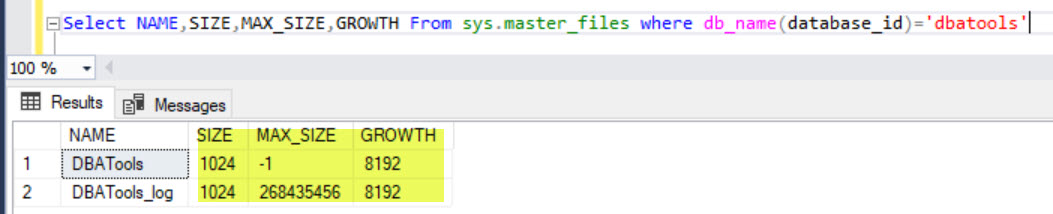
Few days back, One of my colleagues was asking why there is a discrepancy in GUI and system table for Database Properties -> File wizard. Here is an example similar to what he showed me.

GUI Screenshot

SSMS Query Screenshot

My first response was GUI is a user friendly and Query results is a SQL Server Professional friendly. There will be lots of differences like this between GUI and actual table how it saved.But, those are neither discrepancies nor defects, that is how it is by design.

To know this difference, sys.master_files is a system catalog view that represents properties of each file of your database ( data and log). size is always representing in 8 KB pages. Refer the link for more details for other properties.

So, to make him understand, I changed his query a bit to get both looks equal as below.

Select A.name [Logical Name], A.type_desc [File Type], ISNULL(B.Name, 'Not Applicable') 'Filegroup',
(size*8)/1024 [Size (MB)],
'By ' + Cast((growth*8)/1024 as varchar(max)) + 'MB, ' + 
Case when max_size = -1 then 'Unlimited' Else Cast(Max_size as varchar(max)) End + ' MB' [AutoGrowth/MaxSize],
substring(physical_name,0, Len(Physical_name)-charindex('\',reverse(Physical_name),0)+1) [Path],
Right(physical_name,charindex('\',reverse(Physical_name),0)-1) [File Name]
From sys.master_files A
Left Join sys.filegroups B on A.data_space_id = B.data_space_id
where db_name(database_id) = 'DBATools'

I’d like to grow my readership. If you enjoyed this blog post, please share it with your friends!

SQL Server Inventory Queries – SQL Server Databases

Here is a T-SQL script used for inventory purpose on your SQL Server Databases.

Tested in: SQL Server 2016/SQL Server 2017

Script:

drop table if exists #SQLDatabaseInventory;
create table #SQLDatabaseInventory(
  ServerName varchar(128) default @@servername
, database_id bigint
, DBName varchar(128) default db_name()
, DBOwner varchar(128)
, CreateDate datetime2
, RecoveryModel varchar(12) 
, StateDesc varchar(60)
, CompatibilityLevel int
, DataFileSizeMB int
, LogFileSizeMB int
, DataUsageMB int
, IndexUsageMB int
, SizeMB decimal(17,2)
, Collation varchar(60)
, UserCount int
, RoleCount int
, TableCount int
, SPCount int
, UDFCount int
, ViewCount int
, DMLTriggerCount int
, IsCaseSensitive bit
, IsTrustWorthy bit
, LastFullBackupDate datetime2
, LastDiffBackupDate datetime2
, LastLogBackupDate datetime2
, IsTracked sql_variant);

insert into #SQLDatabaseInventory(database_id,DBName, DBOwner, CreateDate, RecoveryModel, StateDesc, CompatibilityLevel, IsCaseSensitive
, IsTrustWorthy, Collation, LastFullBackupDate, LastDiffBackupDate, LastLogBackupDate, IsTracked)
select database_id,name, suser_sname(owner_sid), create_date, recovery_model_desc, state_desc,compatibility_level
, IsCaseSensitive=CAST(CHARINDEX(N'_CS_', collation_name) AS bit), is_trustworthy_on, Collation_Name
, t.LastFullBackup, t.LastDiffBackup, t.LastLogBackup
, Case when is_cdc_enabled = 1 Then 'CDC' else '' End 
from master.sys.databases db
outer apply( SELECT
MAX(CASE WHEN b.type = 'D' THEN b.backup_finish_date END) AS LastFullBackup,
MAX(CASE WHEN b.type = 'I' THEN b.backup_finish_date END) AS LastDiffBackup,
MAX(CASE WHEN b.type = 'L' THEN b.backup_finish_date END) AS LastLogBackup
FROM msdb.dbo.backupset b 
where b.database_name = db.name
) t;

EXEC master.dbo.sp_msforeachdb'use [?]
update t set SizeMB=(select sum(size)/128. from dbo.sysfiles)
, DataUsageMB=x.DataUsageMB, IndexUsageMB=x.IndexUsageMB
   , DataFileSizeMB = u.DBSize, LogFileSizeMB = u.LogSize 
   , TableCount=y.TC, UDFCount=y.UC, SPCount = y.SC, ViewCount=y.VC
   , DMLTriggerCount=y.DC
   , UserCount = z.UC, RoleCount = z.RC
from #SQLDatabaseInventory t
   outer apply (
   SELECT SUM(case when df.type in (0,2,4) then df.size else 0 end)/128
   , SUM(case when df.type in (1,3) then df.size else 0 end)/128 
   FROM sys.database_files df 
   ) u(DBSize, LogSize)
   outer apply(select  DataUsageMB=sum(
    CASE
    When it.internal_type IN (202,204,207,211,212,213,214,215,216,221,222,236) Then 0
    When a.type <> 1 and p.index_id < 2 Then a.used_pages
    When p.index_id < 2 Then a.data_pages
    Else 0
    END)/128,
IndexUsageMB=(sum(a.used_pages)-sum(
    CASE
    When it.internal_type IN (202,204,207,211,212,213,214,215,216,221,222,236) Then 0
    When a.type < > 1 and p.index_id < 2 Then a.used_pages
    When p.index_id < 2 Then a.data_pages
    Else 0
    END
    ))/128
    from sys.partitions p join sys.allocation_units a on p.partition_id = a.container_id
    left join sys.internal_tables it on p.object_id = it.object_id
   ) x
   outer apply 
   ( select SC=Sum(case Type when ''P'' then 1 else 0 end)
    , DC=Sum(case Type when ''TR'' then 1 else 0 end)
    , TC=Sum(case Type when ''U'' then 1 end)
    , UC= sum(case when Type in (''TF'', ''IF'', ''FN'') then 1 else 0 end)
    , VC=Sum(case Type when ''V'' then 1 else 0 end)
    from sys.objects where object_id > 1024
    and type in (''U'',''P'',''TR'',''V'',''TF'',''IF'',''FN'')
   ) y
   outer apply 
   ( select UC = sum(case when [Type] in (''G'',''S'',''U'') then 1 else 0 end)
      , RC = sum(case when Type = ''R'' then 1 else 0 end)
      from sys.database_principals
      where principal_id > 4
   ) z where t.DBName=db_name();
'
SELECT A.*,
Case when is_parameterization_forced = 1 then 'ON' ELSE 'OFF' END is_parameterization_forced,
Case when is_query_store_on = 1 Then 'ON' ELSE 'OFF' End is_query_store_on,
Case When is_broker_enabled = 1 Then 'ON' ELSE 'OFF' End is_broker_enabled,log_reuse_wait_desc,
Case when is_read_only = 1 Then 'READ-ONLY' Else 'ALL' End is_read_only,
Case When is_auto_close_on = 1 Then 'Enabled' Else 'Disabled' End is_auto_close_on,
Case When is_auto_shrink_on = 1 Then 'Enabled' Else 'Disabled' End is_auto_shrink_on,
Case When is_auto_update_stats_on  = 1 Then 'Enabled' Else 'Disabed' End is_auto_update_stats_on
FROM #SQLDatabaseInventory A
inner join sys.databases B
On B.database_id = A.database_id

I would really love to hear from you what else you would like to see to this list?

See Also:

https://sqlzealots.com/2020/04/26/sql-server-inventory-queries-sql-server-instances/

I’d like to grow my readership. If you enjoyed this blog post, please share it with your friends!


SQL Server Inventory Queries – SQL Server Instances

Here is a T-SQL script used for inventory purpose on your SQL Server Instances.

Tested in: SQL Server 2016/SQL Server 2017

Script:

drop table if exists #t;
 
create table #t(
  ServerName varchar(128) default @@servername,
  ServerEdition sql_variant default serverproperty('edition'),
  ServerVersion sql_variant default @@version,
  ProductVersion sql_variant default serverproperty('productversion'),
  ProductLevel sql_variant default serverproperty('ProductLevel'),
  ServerCollation sql_variant default serverproperty('collation'),
  MachineName sql_variant default serverproperty('ComputerNamePhysicalNetBIOS'),
  DefaultDataPath sql_variant default serverproperty('InstanceDefaultDataPath'),
  DefaultLogPath sql_variant default serverproperty('InstanceDefaultLogPath'),
  IsClustered sql_variant default serverproperty('IsClustered'),
  IsFullTextInstalled sql_variant default serverproperty('IsFullTextInstalled'),
  IsIntegratedSecurityOnly sql_variant default CASE SERVERPROPERTY('IsIntegratedSecurityOnly')   
							WHEN 1 THEN 'Windows Authentication'   
							WHEN 0 THEN 'Windows and SQL Server Authentication'   
							END,
  cpu_count int,
  hyperthread_ratio int,
  Physical_Memory_GB Bigint,
  max_workers_count Bigint,
  sqlserver_start_time datetime,
  cores_per_socket bigint,
  numa_node_count bigint,
  --Configuration Details
  [Ad Hoc Distributed Queries] sql_variant,[xp_cmdshell] sql_variant,
  [optimize for ad hoc workloads] sql_variant,[backup compression default] sql_variant,
  [blofcked process threshold (s)] sql_variant,[default trace enabled] sql_variant,
  [clr enabled] sql_variant,[max server memory (MB)]sql_variant,
  [min server memory (MB)] sql_variant,[max degree of parallelism] sql_variant,
  [cost threshold for parallelism] sql_variant,[max text repl size (B)] sql_variant,
  [show advanced options] sql_variant
);

insert into #t(cpu_count,hyperthread_ratio,Physical_Memory_GB,max_workers_count,sqlserver_start_time,cores_per_socket,numa_node_count,
[Ad Hoc Distributed Queries],[xp_cmdshell],[optimize for ad hoc workloads],[backup compression default]
    ,[blofcked process threshold (s)],[default trace enabled],[clr enabled],[max server memory (MB)],[min server memory (MB)]
    ,[max degree of parallelism],[cost threshold for parallelism],[max text repl size (B)],[show advanced options])
 
select cpu_count,hyperthread_ratio,((Physical_Memory_kb/1024.0)/1024.0),max_workers_count,
sqlserver_start_time,cores_per_socket,numa_node_count,
B.*
from sys.dm_os_sys_info A
outer apply ( Select Max([Ad Hoc Distributed Queries]) [Ad Hoc Distributed Queries],
        Max([xp_cmdshell]) [xp_cmdshell] ,
        Max([optimize for ad hoc workloads]) [optimize for ad hoc workloads],
        Max([backup compression default]) [backup compression default],
        Max([blofcked process threshold (s)]) [blocked process threshold (s)],
        Max([default trace enabled]) [default trace enabled],
        Max([clr enabled]) [clr enabled],
        Max([max server memory (MB)]) [max server memory (MB)],
        Max([min server memory (MB)]) [min server memory (MB)],
        Max([max degree of parallelism]) [max degree of parallelism],
        Max([cost threshold for parallelism])[cost threshold for parallelism],
        Max([max text repl size (B)]) [max text repl size (B)],
        Max([show advanced options]) [show advanced options]
 From sys.configurations 
 PIVOT (MAX(Value_in_use) for Name in([Ad Hoc Distributed Queries],[xp_cmdshell],[optimize for ad hoc workloads],[backup compression default]
    ,[blofcked process threshold (s)],[default trace enabled],[clr enabled],[max server memory (MB)],[min server memory (MB)]
    ,[max degree of parallelism],[cost threshold for parallelism],[max text repl size (B)],[show advanced options])) as PVT) B
 
Select * From #t

I would really love to hear from you what else you would like to see to this list?

See Also:

https://sqlzealots.com/2020/04/26/sql-server-inventory-queries-sql-server-databases/

I’d like to grow my readership. If you enjoyed this blog post, please share it with your friends!