Author: Latheesh NK

TIP – SSMS : Color Code your Server

If you are a DBA and deal with lots of servers, especially, production servers, you need to be very careful on applying code changes or configurational changes. Any execution by mistake may lead you trouble, infact a very BIG trouble.

Here is a small TIP, you can follow while you connect to server – a color code method.

Step 1: While you connect the Server, select option .

Step 2: Go to Connection Properties and “Use custome color”.( I use RED for Production Servers, it is a personal choice anyway)

Once you connected with this option enabled, then whenever you connect to the server it uses RED color as the background for status bar.

Tip_SSMS

This tip was very useful for me for a long time, hope you will also enjoy…

Transparent Data Encryption & a case study

Introduction

Today’s world is more concerned on security and sensitivity of data. As the data movement is so volatile in the IT industry, there is high risk of misusing the data source without any security measures. In recent days, IT organizations have been working together closely with in-house security team to make sure the security of data has been considered.
This whitepaper presents a native Encryption technique which has been introduced in SQL Server 2008 called – Transparent Data Encryption (TDE).Transparent Data Encryption allows the encryption of the entire database while providing real time encryption of mdf and ldf files. TDE also ensure encryption on any backups taken while the encryption is enabled. TDE is fairly a straightforward concept as Data is encrypted before it is written to disk and data is decrypted when it is read from disk as it is read into the memory. Hence, there are no special changes needs to be considered on the application code or database queries. This will help in preventing unauthorized access to the data and backup files. TDE will support only in Enterprise and Developer Editions of SQL Server.
TDE_Inage1

Please download the below whitepaper.
TransparentDataEncryption_Whitepaper
OR Github link

Summary Points

• Ensures Security of database at master files (mdf & ldf) and backup files.
• TDE does not increase the size of the encrypted database.
• Encrypts the Entire Database and no granular level of encryption possible.
• When one of the databases on an instance has been set for TDE, then, TEMPDB on that instance also get under the TDE enablement. This might have a performance issue on other databases as TEMPDB is common for that instance.
• The data and logs are encrypted and decrypted to memory real time and that can have performance impact.
• No protection for data in memory.
• FILESTREAM Data will not be encrypted though TDE is enabled.
• TDE does not provide encryption across communication Channels.

Update Table with Random numbers without duplicates in SQL Server

Problem Statement:

Recently, there was a question in one of SQL Server forum asking on updating all table rows with some Random numbers without duplicates. The person who had asked the question could achieve generating the random numbers in a way that there are some duplicates. However, his intention was updating the existing rows with unique random numbers.

Here is the script shared by Questioner


create table RandomNumberUpdate(Col1 bigint)
Go
Insert into RandomNumberUpdate Values(1)
Go 1000

Select * From RandomNumberUpdate

UPDATE RandomNumberUpdate
SET Col1 = CONVERT(int, RAND(CHECKSUM(NEWID())) * 10000)

Once after the update query executes, we can observe there are many duplicates in the table.You may try it yourself and see the duplicates. Use the below query to check the duplicates.


;With cte as
(
Select *,ROW_NUMBER()over(partition by Col1 Order by Col1 asc) Rn From RandomNumberUpdate
)Select* From cte Where rn>1

Solution:

Here is a different approach to get UNIQUE values without duplicates.


UPDATE RandomNumberUpdate
SET Col1 = Abs(Checksum(NewId()))  

Query the table to confirm for any duplicates as below and see that there are no duplicates.


;With cte as
(
Select *,ROW_NUMBER()over(partition by Col1 Order by Col1 asc) Rn From RandomNumberUpdate
)Select* From cte Where rn>1

--Clean the Code

Drop table RandomNumberUpdate

Find the database size (log/row/total) in SQL Server using T-SQL

Today, one of my colleague asked me how to find the database size in SQL Server using T-SQL.

The below script would help you to get the information:


SELECT 
      database_name = DB_NAME(database_id)
    , log_size_mb = CAST(SUM(CASE WHEN type_desc = 'LOG' THEN size END) * 8. / 1024 AS DECIMAL(8,2))
    , row_size_mb = CAST(SUM(CASE WHEN type_desc = 'ROWS' THEN size END) * 8. / 1024 AS DECIMAL(8,2))
    , total_size_mb = CAST(SUM(size) * 8. / 1024 AS DECIMAL(8,2))
FROM sys.master_files WITH(NOWAIT)
WHERE database_id = DB_ID() -- for current db 
GROUP BY database_id

EDITed on 22nd Aug 2016
The below script can be used to identify the same for all databases:


CREATE TABLE TEMP_FILESIZE(DBNAME sysname, log_size varchar(100),row_size varchar(100), total_size varchar(100))
Insert into TEMP_FILESIZE
EXEC sp_msforeachdb '
IF ''?'' not in (''tempdb'',''master'',''msdb'',''model'',''Reportserver'',''ReportserverTempDB'') 
begin 

		SELECT 
			  database_name = ''?''
			, log_size_mb = CAST(SUM(CASE WHEN type_desc = ''LOG'' THEN size END) * 8. / 1024 AS DECIMAL(8,2))
			, row_size_mb = CAST(SUM(CASE WHEN type_desc = ''ROWS'' THEN size END) * 8. / 1024 AS DECIMAL(8,2))
			, total_size_mb = CAST(SUM(size) * 8. / 1024 AS DECIMAL(8,2))
		FROM ?.sys.master_files WITH(NOWAIT)
		WHERE database_id = DB_ID(''?'') -- for current db 
		GROUP BY database_id
end 
' 
Select * From TEMP_FILESIZE Order by log_size desc
DROP Table TEMP_FILESIZE

Added on 20th Sep 2022
The below script can be used to identify the free space for a database:


SELECT DB_NAME() AS DbName,
name AS FileName,
size/128.0 AS CurrentSizeMB,
size/128.0 - CAST(FILEPROPERTY(name, 'SpaceUsed') AS INT)/128.0 AS FreeSpaceMB
FROM sys. database_files
WHERE type IN (0,1);

Travel Planner in SQL Server

Everyone needs a travel plan especially if you are working in India, it is tough to reserve your tickets as it needs. I had lot of bad experiences missing my reservations without a well in advance booking – that pays me a lot.

Here, I would like to share with you one of my SQL Server Script prepared for my travel plan.

The idea is very simple – I would love to see my leave dates and the number of days that I would get. I also wanted to look at an option with a voluntary leave to get more holidays. 🙂

The script is very much configurable and easy to understand, so that anyone can change as per the requirement.

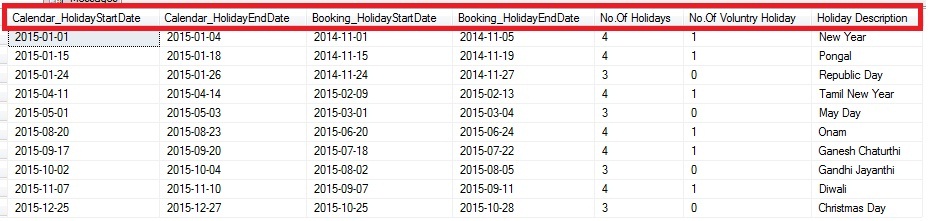
The below screenshot is a sample output of the Script:
Train_Calendar

Script:

Declare @LeaveCalendar as Table (Calendar_Date Date,Train_Date Date,WeekName Varchar(10), Is_NationalHoliday Bit,Is_LocalHoliday Bit, Holiday_Description Varchar(100))

Declare @CalendarYear char(4) = '2015'
Declare @BookingPeriod int = 60 --No.Of days prior the ticket needs to be booked.

;With cteCalendar
as
(
 Select DATEADD(yy, DATEDIFF(yy,0,@CalendarYear + '-01-01'), 0) CalendarDate
 Union All
 Select DATEADD(day,1,Calendardate) CalendarDate From cteCalendar
 Where CalendarDate < DATEADD(yy, DATEDIFF(yy,0,@CalendarYear + '-01-01') + 1, -1)
)
Insert into @LeaveCalendar(Calendar_Date,Train_Date,WeekName)
Select CalendarDate,DATEADD(day,-(@BookingPeriod),CalendarDate),DATENAME(WEEKDAY,CalendarDate) From cteCalendar OPTION(MAXRECURSION 366)

--Saturday and Sunday List Holiday update
Update @LeaveCalendar Set Is_NationalHoliday = 1, Holiday_Description = WeekName
Where WeekName in ('Sunday','Saturday')

--National Holiday List
;with cte(sDate,sDescription) as 
(
 Select @CalendarYear+'-01-01' ,'New Year' 
 Union All
 Select @CalendarYear+'-01-26' ,'Republic Day'
 Union All
 Select @CalendarYear+'-05-01' ,'May Day'
 Union All
 Select @CalendarYear+'-10-02' ,'Gandhi Jayanthi'
 Union All
 Select @CalendarYear+'-12-25' ,'Christmas Day'
)
Update A Set Is_NationalHoliday = 1,Holiday_Description = B.sDescription 
From @LeaveCalendar A
Inner join cte B On A.Calendar_Date = B.sDate 

--LocalHoliday List(The below is a sample, you may add your local holidays in the list)
;with cte(sDate,sDescription) as 
(
 Select @CalendarYear+'-01-15' ,'Pongal' 
 Union All
 Select @CalendarYear+'-04-14' ,'Tamil New Year' 
 Union All
 Select @CalendarYear+'-08-20' ,'Onam' 
 Union All
 Select @CalendarYear+'-09-17' ,'Ganesh Chaturthi'
 Union All
 Select @CalendarYear+'-10-21' ,'Ayudha Puja'
 Union All
 Select @CalendarYear+'-11-10' ,'Diwali'

)
Update A Set Is_LocalHoliday = 1,Holiday_Description = B.sDescription 
From @LeaveCalendar A
Inner join cte B On A.Calendar_Date = B.sDate 

;With cte as
(
Select *,Coalesce(Is_NationalHoliday,Is_LocalHoliday) IsHoliday From @LeaveCalendar
)
,cteHolidayPeriod as
(
 Select *,Coalesce(IsHoliday,Case when Lead(IsHoliday,1)Over(Order by Calendar_date) = Lag(IsHoliday,1)Over(Order by Calendar_Date) 
 and Lag(IsHoliday,1)Over(Order by Calendar_Date) =1 Then 1 
 Else 0 End) as 'Holiday_Period_Voluntry',
 Case when Lead(IsHoliday,1)Over(Order by Calendar_date) = Lag(IsHoliday,1)Over(Order by Calendar_Date) 
 and Lag(IsHoliday,1)Over(Order by Calendar_Date) =1 and IsNull(IsHoliday,0) = 0 Then 1 
 Else NULL End Is_VoluntryHoliday
 From cte
)
,cteReadable as
(
 Select 
 *,datediff(day, '19000101', Calendar_Date) - ROW_NUMBER() OVER (order by Calendar_date) as GroupID 
 From cteHolidayPeriod Where Holiday_Period_Voluntry=1
)
Select *,
(Select Top 1 Holiday_Description From @LeaveCalendar Where Calendar_Date between Calendar_HolidayStartDate and Calendar_HolidayEndDate
 and 1 in (Is_LocalHoliday,Is_NationalHoliday) and Weekname not in ('Saturday','Sunday')) 'Holiday Description'
From(
Select 
 Min(Calendar_date) Calendar_HolidayStartDate,Max(Calendar_date) Calendar_HolidayEndDate,
 DateAdd(day,-1,Min(Train_Date)) Booking_HolidayStartDate,Max(Train_Date) Booking_HolidayEndDate,
 Count(Calendar_Date) 'No.Of Holidays', Count(Is_VoluntryHoliday) 'No.Of Voluntry Holiday'
From cteReadable
Group by GroupID having Count(Calendar_Date)>2)A