Author: Latheesh NK

Myth: Primary Key and Clustered index

Myth:
“When you create a PRIMARY KEY on table, Clustered index is creating by default”
Or
“Primary Key will create a clustered index by default”

Explanation:
I heard these statements many times and recenty, l heard from one of my collegues as well. So thought of sharing with you that the statement is a myth. Though, MSDN article says it very clearly, some of people are not learning or reading it with its completeness.

Please find the Excerpt from MSDN Article:

When you create a PRIMARY KEY constraint, a unique clustered index on the column or columns is automatically created if a clustered index on the table does not already exist and you do not specify a unique nonclustered index..

Now, Let us look at something practical.

First, I would like to create a table with no clustered index(Heap) and define a primary key on the table.[Heap is a table without clustered index.]

Create Table PRIMARYKEY_MYTH(Column1 int NOT NULL,Column2 int)

Alter Table PRIMARYKEY_MYTH Add constraint PK__PRIMARYKEY_MYTH__Column1 PRIMARY KEY(Column1)

sp_help 'PRIMARYKEY_MYTH'

PK__PRIMARYKEY_MYTH__Column1	clustered, unique, primary key located on PRIMARY	

Drop table PRIMARYKEY_MYTH

From the above, we can clearly say that Primary Key is creating a Clustered index on a table.

Second, we need to create a Primary key on a clustered table(Already a clustered index is created on a table)

Create Table PRIMARYKEY_MYTH(Column1 int NOT NULL,Column2 int)

create clustered index IX__PRIMARYKEY_MYTH__Col on PRIMARYKEY_MYTH(Column2)

Alter Table PRIMARYKEY_MYTH Add constraint PK__PRIMARYKEY_MYTH__Column1 PRIMARY KEY(Column1)

sp_help 'PRIMARYKEY_MYTH'
--Results of the sp_help

IX__PRIMARYKEY_MYTH__Col	clustered located on PRIMARY		                
PK__PRIMARYKEY_MYTH__Column1	nonclustered, unique, primary key located on PRIMARY	

Drop table PRIMARYKEY_MYTH

Here, it is very clear, Primary Key on a clustered table is only creating a nonclustered unique index on the table, not the Clustered index.

Hence, I would request you to pronounce the complete statement as

When you create a PRIMARY KEY constraint, a unique clustered index on the column or columns is automatically created if a clustered index on the table does not already exist and you do not specify a unique non clustered index..

I would like to request you to share your thoughts on the same.
How do you find cached plan for a procedure in SQL Server

Everyone,

Today, I would like to share a T-SQL script to identify the cached plan for a procedure in SQL Server. This script would become very handy to gather the cached plan, especially, when you work to troubleshoot any performance issue related to the procedure.

In most cases, we would not be allowed to run the procedure in the production server and gather the actual execution plan. This script would really help for such scenario to collect the cached plan and further analyse the plan.

SELECT TOP 500 DB_NAME(B.dbid),B.objectid,OBJECT_NAME(B.objectid,B.dbid) ObjectName,usecounts,size_in_bytes,
cacheobjtype,objtype,plan_handle,C.encrypted,query_plan, TEXT
FROM sys.dm_exec_cached_plans A
cross apply sys.dm_exec_query_plan(plan_handle) B
CROSS APPLY sys.dm_exec_sql_text(plan_handle) C
WHERE cacheobjtype ='Compiled Plan' and objtype in ('proc') 
/*
*********************************************************
SEARCH SCENARIOS
****************
/* if you need to search that contains the proc name*/
and text like '%proc_name%'
/* if you need to search for exact object as below*/
and OBJECT_NAME(B.objectid,B.dbid)='proc_name'
*********************************************************
*/
ORDER BY SIZE_IN_BYTES DESC , Usecounts asc

Hope you will see the script useful, please share your thoughts on the same.

Error message: complete login process due to delay in opening server connection in SQL Server

Problem Statement:
Some days ago, one of my collegue faced an issue with one of her SQL jobs. SQL Jobs were intermittendly breaking its execution and stopped the processing.When we were analysing the issue in detail, we observed the below error log in SQL Server Error logs.

*********************************************************************************
10/23/2014 @ 00:36:58: Sqlcmd: Error: Microsoft SQL Server Native Client 10.0 : Unable to
10/23/2014 @ 00:36:58: complete login process due to delay in opening server connection.
10/23/2014 @ 01:03:39: Finish External Commandline (1): sqlcmd.exe -Q “EXEC
10/23/2014 @ 01:03:39: spBatchScript
10/23/2014 @ 01:03:39: ‘xxxxxxxxxxxxxxx’, ’10/23/2014
10/23/2014 @ 01:03:39: 00:36:12′, ’10/23/2014 00:36:37′, ’00:00:25.2342135′, ‘Success’,
10/23/2014 @ 01:03:39: ‘0’” -S”xxxxxxx,xxxx” -dSchedulerLog -E
*********************************************************************************

Troubleshooting the Issue:
The below error message was so clear that there were some issues with connectivity.

10/23/2014 @ 00:36:58:        Sqlcmd: Error: Microsoft SQL Server Native Client 10.0 : Unable to 
10/23/2014 @ 00:36:58:        complete login process due to delay in opening server connection. 

As long as the issue was so sporadic in nature, we were not able to simulate the issue and find the cause at the time.So, we decided to go with RING_BUFFER and collect if that could give us some lights.

Step 1: We tried to collect the network issues using the below query,However, there was a 5 days gap between the fact and the reporting, we were not able to collect the info from RING_BUFFER. Finally, we decided to wait for the next event to happened to collect the information:

SELECT CAST(record AS XML) FROM sys.dm_os_ring_buffers
WHERE ring_buffer_type = 'RING_BUFFER_CONNECTIVITY'

Step 2: The output from the above query was too large and it was very difficult to analyse the file manually. Hence, we come up with the following shredding method to get the info only related with Connectivity.
You may find the script used:

--You may need assign the result of above query to variable @x.
Declare @x XML = ''

--Actual Query
;With cte as
(
SELECT
	e.value('../@id[1]','VARCHAR(10)') AS RecordId,
	e.value('RecordType[1]','VARCHAR(10)') AS RecordType,
	e.value('Spid[1]','VARCHAR(10)') AS Spid,
	e.value('SniConnectionId[1]','VARCHAR(100)') AS SniConnectionId,
	e.value('SniProvider[1]','VARCHAR(10)') AS SniProvider,
	e.value('SniConsumerError[1]','VARCHAR(10)') AS SniConsumerError,
	e.value('RemoteHost[1]','VARCHAR(50)') AS RemoteHost,
	e.value('RemotePort[1]','VARCHAR(10)') AS RemotePort,
	e.value('LocalHost[1]','VARCHAR(50)') AS LocalHost,
	e.value('LocalPort[1]','VARCHAR(10)') AS LocalPort,
    e.value('RecordTime[1]','datetime') AS RecordTime,
	e.value('OSError[1]','VARCHAR(10)') AS OSError,
	e.value('State[1]','VARCHAR(10)') AS State,
	x1.e1.value('PhysicalConnectionIsKilled[1]','VARCHAR(10)') AS PhysicalConnectionIsKilled,
	x1.e1.value('DisconnectDueToReadError[1]','VARCHAR(10)') AS DisconnectDueToReadError,
	x1.e1.value('NetworkErrorFoundInInputStream[1]','VARCHAR(10)') AS NetworkErrorFoundInInputStream,
	x1.e1.value('ErrorFoundBeforeLogin[1]','VARCHAR(10)') AS ErrorFoundBeforeLogin,
	x1.e1.value('SessionIsKilled[1]','VARCHAR(10)') AS SessionIsKilled,
	x1.e1.value('NormalDisconnect[1]','VARCHAR(10)') AS NormalDisconnect
FROM @x.nodes('//ConnectivityTraceRecord') x(e)
Cross Apply x.e.nodes('TdsDisconnectFlags')x1(e1)
) Select * From cte where RecordTime between '2014-12-09 22:00:19.940' and '2014-12-09 22:50:19.940'

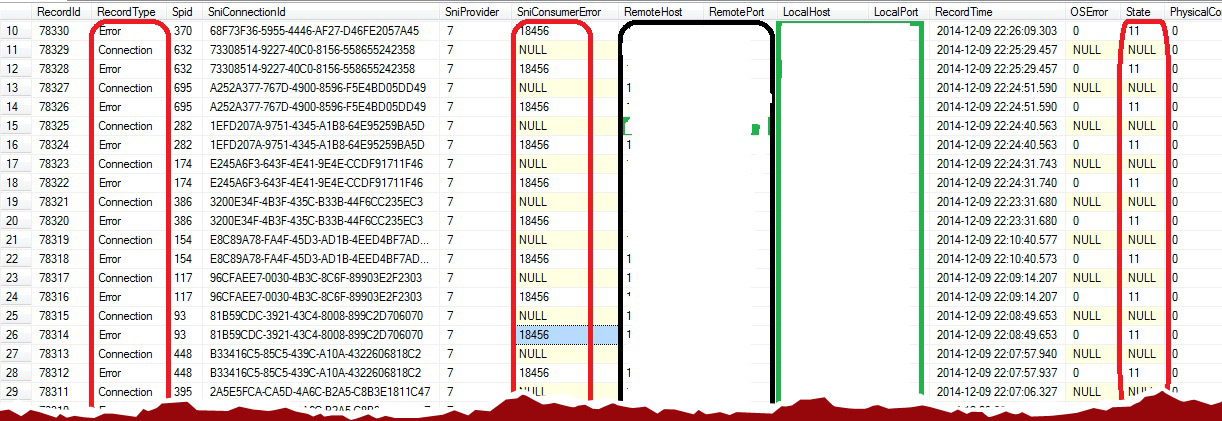
Step 3: When we analysed the query result, we observed some pattern as below:

paper

Here, we would like to look at two things: SniConsumerError number and State columns. And state column will provide information on how we should further proceed.

Please find the below table for different States and its descriptions. (The below is logically grouped for very common issues. If you are looking for an exhuastive list of descriptions, I would recommand you to go through Aaron Bertrand’s blog post).

Network_Issue1

From the above, it is clear that there were some issues with server access failures. We reported back to the respective team (Network team) to proceed further on troubleshooting the issue with our observations.

Hope, this would help you for similar situations. I request you to share your experiences as part of our sharing and learning process.

Find the number of columns with exact match of a search word using XQUERY in SQL Server

Problem Statement:
Today, we are going to see a method to find the number of columns with exact match of a search word in a table.

This can be achieved in a very simple way using XQUERY. I just would like to share the code sample that I tried to get the information.

DDL and Sample Data:


create table test_ExactMatchsearch
(
id int identity(1,1),val1 varchar(200), Val2 varchar(200)
)

insert into test_ExactMatchsearch values('SQL','Server')
insert into test_ExactMatchsearch values('BizTalk','Server')
insert into test_ExactMatchsearch values('PLSQL','Oracle')
insert into test_ExactMatchsearch values('PL','SQL')
insert into test_ExactMatchsearch values('SQLServer','SQL')
insert into test_ExactMatchsearch values('SQL','SQL')

In the above table I would like to search “SQL” and find the presence of the exact search word.

Actual Code:


declare @SearchWord varchar(10)
set @SearchWord = 'SQL'

--How to find the number of columns available the exact word.
;with xmlnamespaces('http://www.w3.org/2001/XMLSchema-instance' as ns)
select *,
       (
          select *
 from test_ExactMatchsearch as T2
 where T1.id = T2.id
          for xml path('row'), elements xsinil, type 
       ).value('count(//*[text()=sql:variable("@SearchWord")])','varchar') as ExactMatchColumnCount
from test_ExactMatchsearch as T1

Result:
ExactMatchScrrenshot
Clean up the Table object:


Drop table test_ExactMatchsearch

Change first character of table names with capital character including intermediate words using sp_rename

How about your collegue asking you to change all of your table names with capital character including intermediate words?

Here is a quick way for you to get it done.

Step 1: You need to create the below function. The below function would change the name that you pass to desired format. The below script is written by George Mastros (gmmastros), a mind-blowing script, may be the fastest for such scenarios.

Create FUNCTION dbo.InitialCap(@String VARCHAR(8000))
RETURNS VARCHAR(8000)
AS
	BEGIN 
	---------------------------------------------------------
	DECLARE @Position INT

	SELECT @String   = STUFF(LOWER(@String),1,1,UPPER(LEFT(@String,1))) COLLATE Latin1_General_Bin,
        @Position = PATINDEX('%[^A-Za-z''][a-z]%',@String COLLATE Latin1_General_Bin)

	WHILE @Position > 0
		SELECT @String   = STUFF(@String,@Position,2,UPPER(SUBSTRING(@String,@Position,2))) COLLATE Latin1_General_Bin,
				@Position = PATINDEX('%[^A-Za-z''][a-z]%',@String COLLATE Latin1_General_Bin)

	---------------------------------------------------------
	RETURN @String;
END 

Step 2: Verify the changes done by the above function. The below script will generate script to rename the tables using sp_rename . sp_rename is a system procedure to change the name of user created objects like tables, index, column or CLR user types. Do remember,when you change the object name, there is a chance of breaking your codes, so be careful!!!

select 'exec sp_rename @objname=[' + name + '], @newname=[' + dbo.InitialCap(name) + ']'
from sysObjects
where type = 'U'

Step 3: Apply the changes once verified.

Declare @s nvarchar(MAX)=''
select @s = @s+'exec sp_rename @objname=[' + name + '], @newname=[' + dbo.InitialCap(name)  +'];' 
from sysObjects
where type = 'U'
--print @s
exec(@s)