Author: Latheesh NK

How to track SQL Server Database connections using T-SQL

One of my friend was asking to get him information from SQL Server to troubleshoot some performance issues.
My initial understanding, to collect data from the Performance counters, however, I realized that my friend is looking for information at grouping HostName, ProgramName etc.

Hence, come up with a small script as below to capture the details every 1 minute(customized as per the request).


If exists(Select 1 From sys.tables where name='Capture_DBConnection')
Drop table Capture_DBConnection

Create Table Capture_DBConnection (CapturedTime datetime,SPID Varchar(MAX), [Status] varchar(50),Login nvarchar(100),HostNAme varchar(5000),BlkBy Varchar(MAX), DBNAME sysname null,Command varchar(MAX),CPUTIME Varchar(MAX), DISKIO Varchar(MAX),
LastBatch Varchar(MAX), ProgramName Varchar(MAX),SPID1 Varchar(MAX), REQUESTID Varchar(MAX))

While(1=1)
Begin
	Create Table #Capture_DBConnection (SPID Varchar(MAX), [Status] varchar(50),Login nvarchar(100),HostNAme varchar(5000),BlkBy Varchar(MAX), DBNAME sysname null,Command varchar(MAX),CPUTIME Varchar(MAX), DISKIO Varchar(MAX),
		LastBatch Varchar(MAX), ProgramName Varchar(MAX),SPID1 Varchar(MAX), REQUESTID Varchar(MAX))
	
	Insert into #Capture_DBConnection Exec Sp_who2
	Insert into Capture_DBConnection 
	Select getdate(),* from #Capture_DBConnection 
	Drop table #Capture_DBConnection
	Waitfor delay '00:01:00'
END

Usage:
Here are few examples how to use the data collected.


-- Row data
Select * From Capture_DBConnection

-- To get count of connection for specified group
Select CapturedTime, HostName, ProgramName, Count(CapturedTime)
From Capture_DBConnection
Group by CapturedTime, HostName, ProgramName

Hope, this script will help you if you come across such situation.

How to identify non-indexed foreign keys in SQL Server

Here is a script to identify foreign keys without any supporting index in SQL Server.

The script is developed on an assumption to verify ONLY the leading column of the index and the foreign key. This is to avoid any duplicate indexes that could create without a detailed analysis.


;WITH CTE AS 
(
	SELECT A.NAME,SCHEMA_NAME(A.SCHEMA_ID) SCHEMA_NAME,OBJECT_NAME(B.REFERENCED_OBJECT_ID) PARENT_TABLE_NAME,OBJECT_NAME(B.PARENT_OBJECT_ID) CHILD_TABLE_NAME,
	B.PARENT_OBJECT_ID,B.PARENT_COLUMN_ID,C.COLUMN_NAME COLUMNNAME
	,ROW_NUMBER()OVER(PARTITION BY A.NAME,A.SCHEMA_ID,B.REFERENCED_OBJECT_ID,B.PARENT_OBJECT_ID ORDER BY C.ORDINAL_POSITION ASC) RN
	FROM SYS.FOREIGN_KEYS A
	INNER JOIN SYS.FOREIGN_KEY_COLUMNS B ON A.OBJECT_ID = B.CONSTRAINT_OBJECT_ID
	INNER JOIN INFORMATION_SCHEMA.COLUMNS C ON C.COLUMN_NAME=COL_NAME(B.PARENT_OBJECT_ID,B.PARENT_COLUMN_ID) AND OBJECT_NAME(B.PARENT_OBJECT_ID)=C.TABLE_NAME 
)
SELECT A.NAME FOREIGNKEY_NAME,A.SCHEMA_NAME,A.PARENT_TABLE_NAME,A.CHILD_TABLE_NAME,A.COLUMNNAME FORIEGNKEY_LEADCOLUMN
FROM CTE A
LEFT JOIN SYS.INDEX_COLUMNS D ON D.OBJECT_ID = A.PARENT_OBJECT_ID AND D.COLUMN_ID = A.PARENT_COLUMN_ID AND KEY_ORDINAL=1 
LEFT JOIN SYS.INDEXES D1 ON D.OBJECT_ID = D1.OBJECT_ID AND D.INDEX_ID=D1.INDEX_ID
LEFT JOIN SYS.COLUMNS E ON E.COLUMN_ID=D.COLUMN_ID AND E.OBJECT_ID=D.OBJECT_ID  
WHERE D.COLUMN_ID IS NULL AND A.RN=1
ORDER BY CHILD_TABLE_NAME ASC

New enhancement in SSMS in SQL Server

SSMS in SQL 2016 has come up with lots of new features. One of the features is enhanced scrollbar in SSMS. I personally believe the new enhancement in scrollbars will definitely help developers to work with SSMS with ease.

Let us look at the below picture to have an insight:

They are different color bocks on the right side of SSMS query window that shows the changes:
a. Green blocks show the saved lines of Query part in a window to disk
b. Yellow blocks show the query lines of unsaved/changed lines since last save to disk
c. Red blocks show any syntax errors in a query window
d. Blue block shows the current cursor location

It is definitely good to know to developers who plays around with SSMS very frequently.

How to identify the referenced objects of an object in SQL Server

Here is a very small script that helps you to identify the referenced objects of an object in SQL Server.


Declare @ParentObject_name sysname = 'YOUR OBJECT'
;With cte as (
Select OBJECT_NAME(referencing_id) Parent_ObjectName,referenced_entity_name Referenced_ObjectName,
		ISNULL((Select type From sys.objects where name = SED.referenced_entity_name),'**')  ObjType
From sys.sql_expression_dependencies SED where referencing_id = object_id(@ParentObject_name)
union All
Select OBJECT_NAME(referencing_id),SED.referenced_entity_name,
		ISNULL((Select type From sys.objects where name = SED.referenced_entity_name),'**')  ObjType
From sys.sql_expression_dependencies SED 
Inner join cte c On SED.referencing_id = object_id(c.Referenced_ObjectName) 
Where OBJECT_NAME(referencing_id)  SED.referenced_entity_name and c.ObjType Is NOT NULL
)
Select * From cte  

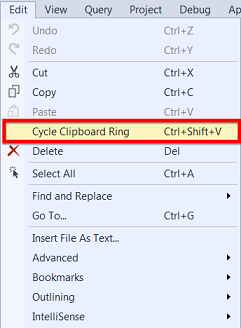
Cycle Clipboard ring in SQL Server Management Studio

“Cycle Clipboard” or “CTRL + SHIFT + V” is a short cut operation for pasting the items in the clipboard. This feature can paste last 20 items in the clipboard memory.

This is a very efficient method for developers to paste items not only the last copied, also any of the last 20 items. We need to just iterate through the clipboard memory by pressing CTRL+SHIFT+V until we get the desired item to be pasted.

Hope you enjoyed this tip, will reach you with more soon.