
GUI Screenshot

SSMS Query Screenshot
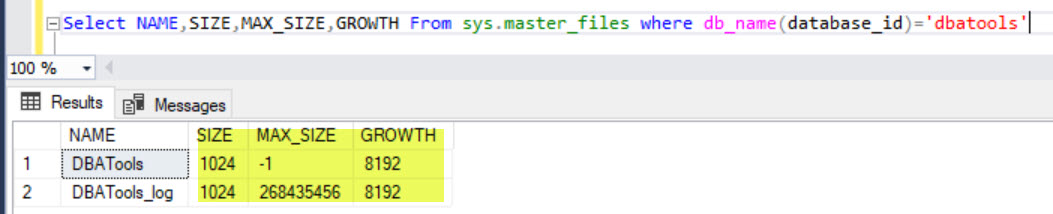 My first response was GUI is a user friendly and Query results is a SQL Server Professional friendly. There will be lots of differences like this between GUI and actual table how it saved.But, those are neither discrepancies nor defects, that is how it is by design.
To know this difference, sys.master_files is a system catalog view that represents properties of each file of your database ( data and log). size is always representing in 8 KB pages. Refer the link for more details for other properties.
So, to make him understand, I changed his query a bit to get both looks equal as below.
My first response was GUI is a user friendly and Query results is a SQL Server Professional friendly. There will be lots of differences like this between GUI and actual table how it saved.But, those are neither discrepancies nor defects, that is how it is by design.
To know this difference, sys.master_files is a system catalog view that represents properties of each file of your database ( data and log). size is always representing in 8 KB pages. Refer the link for more details for other properties.
So, to make him understand, I changed his query a bit to get both looks equal as below.
Select A.name [Logical Name], A.type_desc [File Type], ISNULL(B.Name, 'Not Applicable') 'Filegroup',
(size*8)/1024 [Size (MB)],
'By ' + Cast((growth*8)/1024 as varchar(max)) + 'MB, ' +
Case when max_size = -1 then 'Unlimited' Else Cast(Max_size as varchar(max)) End + ' MB' [AutoGrowth/MaxSize],
substring(physical_name,0, Len(Physical_name)-charindex('\',reverse(Physical_name),0)+1) [Path],
Right(physical_name,charindex('\',reverse(Physical_name),0)-1) [File Name]
From sys.master_files A
Left Join sys.filegroups B on A.data_space_id = B.data_space_id
where db_name(database_id) = 'DBATools'
 I’d like to grow my readership. If you enjoyed this blog post, please share it with your friends!
 SQLZealots