Category: SQL

sp_msforeachdb: Changing recovery model for all databases

Introduction:

Here is another script that used sp_msforeachdb to change the recovery model for all the databases.

Note: There is a caveat that changing the recovery model is not recommended without thorough knowledge, but here we are only discussing the technical aspect.


Select name,recovery_model_desc From Sys.databases

--To avoid/exception on applying the change, you may add your databases in the list.
EXEC sp_msforeachdb '
IF ''?'' not in (''tempdb'',''master'',''msdb'',''model'',''Reportserver'',''ReportserverTempDB'')
begin
    exec (''ALTER DATABASE [?] SET RECOVERY SIMPLE;'')
end
'

Select name,recovery_model_desc From Sys.databases

See Also:

You may be interested to know more on sp_MSforeachdb usage, please visit the below links

https://gallery.technet.microsoft.com/T-SQL-Script-Get-Table-Row-94e49d01
https://gallery.technet.microsoft.com/How-to-change-datacompressi-47dfce48
https://latheeshnk.wordpress.com/2015/05/06/identify-references-of-an-object-in-sql-server/

TSQL Script to get Backup details in SQL Server

One of my colleague was looking for a script to identify the backup details for one his databases. Here is a very simple script to identify database backup details.

Purposes:

1. To confirm all the backup jobs are running fine at the defined intervals
2. To confirm the necessary backup strategies are in place For ex: For FULL recovery model requires frequent log backups to avoid the space issues
3. To identify the backup startdate and finishdate for backups
4. To identify the device name to which backups are initiated
5. To identify who initiated the backups(username)

SCRIPT


SELECT  
   CONVERT(CHAR(100), SERVERPROPERTY('Servername')) AS Server, 
   BkpSet.server_name,
   BkpSet.database_name, BkpSet.recovery_model,
   BkpSet.backup_start_date, BkpSet.backup_finish_date, 
   BkpSet.expiration_date, 
   CASE BkpSet.type  
       WHEN 'D' THEN 'Database(FULL)' 
       WHEN 'I' THEN 'Differential' 
       WHEN 'L' THEN 'Log'  
   END AS backup_type, BkpSet.backup_size,  
   BkpMF.logical_device_name,  BkpMF.physical_device_name,   
   BkpSet.name AS backupset_name, BkpSet.description, user_name
   FROM   msdb.dbo.backupmediafamily BkpMF
   INNER JOIN msdb.dbo.backupset BkpSet 
           ON BkpMF.media_set_id = BkpSet.media_set_id  
   WHERE  
   (CONVERT(datetime, BkpSet.backup_start_date, 102) >= GETDATE() - 7)  
   ORDER BY BkpSet.backup_finish_date desc

See Also:
Read more on SQL Server Job details:
https://latheeshnk.wordpress.com/2015/04/03/t-sql-script-get-sql-job-details-and-history-details/

Identify references of an object in SQL Server

Problem Statement:

Today, there was a requirement from one of my colleague “How to identify a function references in SQL Server?”.

Infact, He was looking for a script to identify the reference places(objects) where the function is being used in SQL Server. Please find the script below that we used to identify the references.

Script:

DECLARE @ObjectName NVARCHAR(100)
SET @ObjectName = N'split' --Give your function/proc name

--Table variable to hold the results from different databases
Declare @ResultTable Table(SourceSchema sysname, Sourceobject sysname, ReferencedDB sysname, ReferencedSchema sysname, ReferencedObject sysname)

Declare @MyQuery NVARCHAR(MAX) = N'
USE [?]
SELECT DISTINCT
	SourceSchema      = OBJECT_SCHEMA_NAME(sed.referencing_id)
	,SourceObject     = OBJECT_NAME(sed.referencing_id)
	,ReferencedDB     = ISNULL(sre.referenced_database_name, DB_NAME())
	,ReferencedSchema = ISNULL(sre.referenced_schema_name,
	OBJECT_SCHEMA_NAME(sed.referencing_id))
	,ReferencedObject = sre.referenced_entity_name
FROM sys.sql_expression_dependencies sed
CROSS APPLY sys.dm_sql_referenced_entities(OBJECT_SCHEMA_NAME(sed.referencing_id) + ''.'' +       	                           OBJECT_NAME(sed.referencing_id), ''OBJECT'') sre
WHERE sed.referenced_entity_name like ''%' + @ObjectName + '%'' AND sre.referenced_entity_name like ''%' + @ObjectName + '%''';

Insert into @ResultTable
EXEC sp_MSforeachdb  @MyQuery

Select * From @ResultTable

The above script uses sp_MSforeachdb to execute the query in all databases available in the SQL Server.

Please note that sp_MSforeachdb is an undocumented procedure, Microsoft may change the functionality or definition of this Stored Procedure at any time.

See Also:

You may be interested to know more on sp_MSforeachdb usage, please visit the below links

https://gallery.technet.microsoft.com/T-SQL-Script-Get-Table-Row-94e49d01
https://gallery.technet.microsoft.com/How-to-change-datacompressi-47dfce48

PARSENAME in SQL Server: a Powerful function

Introduction:
PARSENAME is one of my favourite functions in SQL Server. But, unfortunately, I could not see many people using this function efficiently.So, I thought of sharing some of its usages here with you.

PARSENAME function can be used to retrive specified part of a string that has four parts separated with DOT(.). This function can be used efficiently to retrive the each part name with four part names like fully qualified objectnames.


--Database four part Object name Usage
create Table Test_ParseName(ObjectName Varchar(100))

Insert into Test_ParseName Values('SER1.DB1.SCH1.TAB1'),('SER2.DB2.SCH2.TAB2')

Select PARSENAME(ObjectName,4) 'SERVERNAME',PARSENAME(ObjectName,3) 'DBNAME',PARSENAME(ObjectName,2) 'SCHEMANAME',PARSENAME(ObjectName,1) 'OBJNAME'
From Test_ParseName

Drop table Test_ParseName

The above is a typical example used in Books online(BOL).

Here, I would like to introduce some more scenarios where we can efficiently use PARSENAME function.

1. To separate IPAdress Sections and for its validation:
Note: IPAddress validation is not a fool-proof solution, however, used to showcase a typical usage of PARSENAME.


create Table Test_ParseName(IPAddress Varchar(100))

Insert into Test_ParseName Values('10.123.123.234'),('10.234.12.123'),('101.123.234.12.123'),('10.234.12'),('10.234.12.')

Select IPAddress,
		PARSENAME(IPAddress,4) 'SECTION1',PARSENAME(IPAddress,3) 'SECTION2',
		PARSENAME(IPAddress,2) 'SECTION3',PARSENAME(IPAddress,1) 'SECTION4',
		/*Another Usage If we want to check the test is satisfying the 4 part naming separated by "."
		Please note that it does not cover the entire validation of IPAdress*/
		Case when (PARSENAME(IPAddress,1) is not null and PARSENAME(IPAddress ,4) is not null) 
				Then 'Satisfied four part' Else 'Invalid format' End
From Test_ParseName

Drop table Test_ParseName

PARSENAME_image2

2. Another example with REPLACE function:
PARSENAME can be used along with REPLACE in many places. Try out the below;the below sample will replace “-” character with “.” and use PARSENAME to separate the four part string easily.


create Table Test_ParseName(string Varchar(100))

Insert into Test_ParseName Values('Check-function-usage-efficiently'),('Check-function-usage'),('Check-function'),('Check'),('Check-function-usage-efficiently-failed')

;With cte_Test_parsename as
(Select REPLACE(string,'-','.') stringmodified From Test_Parsename)

Select stringmodified,
		PARSENAME(stringmodified,4) 'SECTION1',PARSENAME(stringmodified,3) 'SECTION2',
		PARSENAME(stringmodified,2) 'SECTION3',PARSENAME(stringmodified,1) 'SECTION4'
From cte_Test_parsename

Drop table Test_ParseName

PARSENAME_image3

Hope you enjoyed this post. I would like to request you to share any other scenario you come across where PARSENAME can be efficiently used.

Myth: Truncate cannot be rolled back as it is not logged

Discussion Point:
Once again, I heard “Truncate cannot be rolled back where as DELETE can.”. There are many posts available in net regarding and still many people believe that truncate can not be rolled back within a transaction.

Lets us test and see the facts here.

Step 1: To understand better, We are going to create a test table and load some data to the test table as below:


--Create test table - Test_Rollback
create Table Test_Rollback(ProductID int, Product_Name Varchar(MAX))
Go

--Data generation to Test_Rollback table
;With cte as
(
	Select 1 ProductID, Cast('a' as varchar(MAX)) Product_Name
	Union All
	Select ProductID +1 , Replicate(Cast('a' as varchar(MAX)),ProductID +1)
	From Cte A where PRoductId <= 1000
)
Insert into Test_Rollback
 Select ProductID, Product_Name From cte Option(MAXRECURSION 1000)

--Check the Table data
Select * From Test_Rollback

Here, we inserted 1001 records to Test_Rollback table to proceed with our testing.

Step 2: Now, We are going to DELETE records from the table and see the effect of ROLLBACK. In addition, we are also going to capture the number of logs generated during the delete operation.


CheckPoint
--Delete operation
Begin Tran Tran_Delete
	Delete From Test_Rollback
	Select Description,[Transaction Name],* From fn_dblog(NULL,NULL) WHERE [AllocUnitNAme] = 'dbo.Test_Rollback' --1001 Records
Rollback Tran Tran_Delete

Here, we issued a CHECKPOINT to move the active portion of the log forward to have a clarity for our testing. Please note that, CHECKPOINT does not mean that those logs are cleared or dumped, its still available in the log.
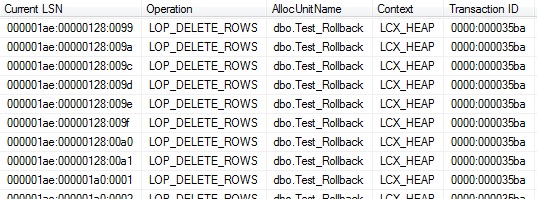
Once, the delete operation is completed, we used fn_dblog function (one among undocumented functions used to read the transaction log records from the active portion of transaction log file. Though fn_dblog is a very powerful function, as long as it is a undocumented function, please refrain the use of this function in production environment.) to read the transaction records. As fn_dblog function usually returns lots of information, we tried to filter information related to the AllocUnitName to our table (dbo.Test_Rollback). As we queried the information, we could find that there are 1001 records which indicates that the delete operation does at row level, each log for each record as below.
Snapshot:
Tran_Delete

Step 3: Now, We are going to TRUNCATE the table and see the effect of ROLLBACK. In addition, we are also going to capture the number of logs generated here as well.


Checkpoint
--Truncate Operation
Begin Tran Tran_Truncate
	Truncate Table Test_Rollback
	Select Description,[Transaction Name],* From fn_dblog(NULL,NULL)  WHERE  [AllocUnitNAme] = 'dbo.Test_Rollback' --40 Records
Rollback Tran Tran_Truncate

Here, we see the log records are only 40 which is far less than what we have seen with DELETE operation(1001). Closely looking at the Description, we can see that the description states that Deallocation of Extents are carried out during the TRUNCATE.See the below sample(only one sample is provided for understanding).

Deallocated 0001:00003528;Deallocated 0001:00003529;Deallocated 0001:0000352a;Deallocated 0001:0000352b;Deallocated 0001:0000352c;Deallocated 0001:0000352d;Deallocated 0001:0000352e;Deallocated 0001:0000352f
Deallocated 1 extent(s) starting at page 0001:00003528

Snapshot:
Tran_Truncate

This is a clear indication that when a table is getting TRUNCATE, the TRUNCATE is deallocating at EXTENT level not at ROW level. Hence we could see the number of logs generated are considerably lesser than the DELETE operation.

Step 5: Now lets query the table and see for data existence.


--Check the Table data
Select * From Test_Rollback

Cool, we can see the data in the table. What does it mean? TRUNCATE can also be Rolled back within the transaction.

Step 5: As a final step, we are going to clean up our test table.


Select * from Test_Rollback
Drop table Test_Rollback

Conclusions: Let us conclude our findings here:

1. TRUNCATE is a logged operation, in fact does more efficiently by deallocating the extents.
2. TRUNCATE does a deallocation at Extent level not at ROW level.
3. As TRUNCATE does at Extent level, it logs lesser records in log file than DELETE. Hence, TRUNCATE would be faster than DELETE.
4. Finally, Debunk the Myth, TRUNCATE Table in a transaction can also be rolled back.

Hope this post would be useful, please share your thoughts.