Category: SQL

How to check SQL Services status in SQL Server

As a DBA, it is very important for all of us to make sure SQL Services are up and running.But Is there an easy way to get this information in SQL Server?

The answer is simple, yes. Microsoft has introduced a new DMVs – sys.dm_server_services. dm_server_services DMV is available right from SQL Server 2008R2 (SP1). This has made life easy for most of DBAs from writing a bunch of codes.

SELECT 
	SERVICENAME, STARTUP_TYPE_DESC, STATUS_DESC,
        LAST_STARTUP_TIME,SERVICE_ACCOUNT,
        IS_CLUSTERED ,CLUSTER_NODENAME 
FROM SYS.DM_SERVER_SERVICES

ServiceCheck

Notes:

1. Login needs to be provided with VIEW SERVER STATE PERMISSION
2. Support is available for SQL Server 2008 R2(SP1) and later versions

Read Also:
SYS.DM_SERVER_SERVICES

Dissecting Blocked-process-Report in SQL Server

Objective:
This post explains How to analyze the blocked-process-report captured using Event Notification in detail,However, this does not cover the configuration/set up of the Event notification in SQL Server.

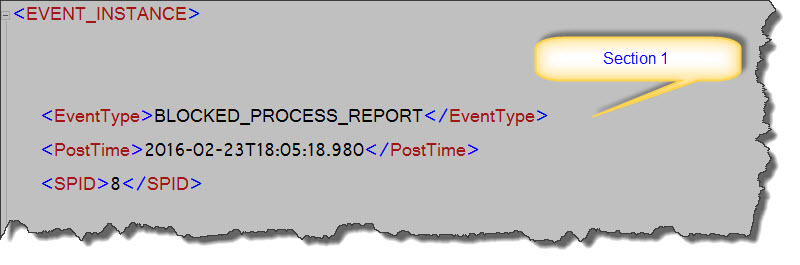
Let us look at a typical report captured. The report has been logically divided into three sections to make our analysis simple.

First Section:
BPR_Section1

The above image shows the first section which contains
EventType – Event type of the Report which is BLOCKED_PROCESS_REPORT
PostTime – It is the date and time that the event posts
SPID – Session ID(Server Process ID) information

Second Section:
BlockedProcess

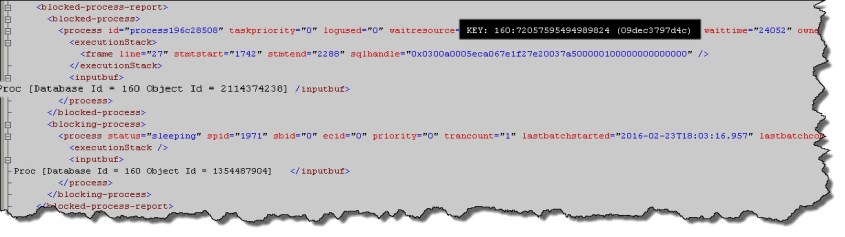
Second section contains two major tags – Blocked-process and Blocking-process.

In Blocked Process, we can first look at the waitresource attribute. Here in the above image waitresource=”KEY: 160:72057595494989824 (09dec3797d4c)”.


KEY- represents the lock on the object is at Key level

160- The second section is the database id.

		To get the database name, you can use the below query:
		Select DB_NAME(160)--DBNAME

72057595494989824- This section can be used to identify the associated object with the blocking as below.
				
		Select OBJECT_NAME(object_id) From sys.partitions where hobt_id =72057595494989824


(09dec3797d4c)	- This represents the actual data. This can be queried on the associated objects using %%lockres%% 

		Select * From <> Where %%lockres%% = '(77576a23d4db)'


Note: %%lockres%% is an undocumented virtual column to identify the key hash value. As this is an undocumented feature, Microsoft will no longer support its usage in production environment, hence no warranties.

From the above, we would be able to get the type of lock,Databasename, the associated object and data.

Further, let us look at the inputbuf tag.


Proc [Database Id = 160 Object Id = 2114374238]
Proc [Database Id = 160 Object Id = 1354487904] 

- This section provides the query/procedure information.
Select * From sys.procedures where object_id=2114374238 
Select * From sys.procedures where object_id=1354487904 

Third Section:

BPR_Section3

Finally, the third section includes other basic information like DatabaseID, TransactionID, Duration, StartTime, EndTime, ObjectID, IndexID, ServerName, Mode, LoginSID, EventSequence, IsSystem and SessionLoginName.

Hope, this post will help you to identify some important information from the blocked process report that can be used for troubleshooting your blocking/locking issues.

Have your thoughts on the same as part of our learning an sharing....Have a good day ahead!

UNIQUEIDENTIFIER and Search behavior in SQL Server

This post explains about a different behavior with search for UNIQUEIDENTIFIER datatype column in SQL Server.

If you would have worked with UNIQUEIDENTIFIER before, you would have come across this scenario earlier. But for those not, let us see the scenario.

CREATE TABLE TEST (COLUMN1 UNIQUEIDENTIFIER)
INSERT INTO TEST VALUES(‘F7ABC3AA-0534-44F3-BDBB-0011CEFB6993′)

–Search a value in the column by adding “extra” characters
SELECT * FROM TEST WHERE COLUMN1=’F7ABC3AA-0534-44F3-BDBB-0011CEFB6993.XML’

You will expect the search will not return any data as it can not find the exact match, however, it returns results!!!

Unique

What is reason for this strange behaviour?

No, this is not a strange behaviour, its an intended and default behaviour in SQL Server for UNIQUEIDENTIFIER.

Let us look at what happens behind the scene.First step is enable the execution plan and execute the SELECT query.

ExePlan_Unique

As per the execution plan, SQL Server does an Implicit conversion of the value to uniqueidentifier before the search happens.As a result, only first 36 characters is being used for the search condition and returns the results.Any characters more than 36, would be ignored in the search condition.

For completeness, Please note that if we are passing a value that can not be converted as unique identifier, it will throw an exception as below.

SELECT * FROM TEST WHERE COLUMN1=’F7ABC3AA-0534-44F3-BDBB-0011CEFB699′

Msg 8169, Level 16, State 2, Line 5
Conversion failed when converting from a character string to uniqueidentifier.

UniqueError

Hope you enjoyed this post, have your thoughts on the same.

How to list file names in a folder in SQL Server

Here is a very small script to list the file names in a folder using SQL Server.

The below snippet has been useful for us to automate the restore process from a defined path(for large number of backup files).


/**********************************************************************/
	DECLARE @COMMANDSHELL TABLE ( LINE VARCHAR(512)) 
	DECLARE  @CMD VARCHAR(512) ,@BACKUPFILEPATH NVARCHAR(256)
	SET @BACKUPFILEPATH = 'D:\DATABASES\BACKUPS\' 
	SET @CMD = 'DIR /B ' + @BACKUPFILEPATH +  ' /TC' 
				
	INSERT INTO @COMMANDSHELL EXEC MASTER..XP_CMDSHELL   @CMD 

	--Data Clean up 
	DELETE FROM   @COMMANDSHELL WHERE  LINE IS NULL

	SELECT* FROM @COMMANDSHELL A
/**********************************************************************/

Prerequisites: You may need to enable the xp_cmdshell using sp_configure as below:


--To Enable the advanced Options
EXEC SP_CONFIGURE 'SHOW ADVANCED OPTIONS',1
RECONFIGURE WITH OVERRIDE

--To Enable XP_CmdShell 
EXEC SP_CONFIGURE 'XP_CMDSHELL',1
RECONFIGURE WITH OVERRIDE

--To Disable the advanced Options(by default)
EXEC SP_CONFIGURE 'SHOW ADVANCED OPTIONS',0
RECONFIGURE WITH OVERRIDE

How to find index usage from cached plan in SQL Server

Today, I would like to share a script to identify the usage of index from cached plan in SQL Server. This would help us to identify the places (procs/functions etc) where the index is being used. One interesting use-case is to identify the index usage that has been introduced recently during the performance optimization.


;WITH XMLNAMESPACES(DEFAULT N'http://schemas.microsoft.com/sqlserver/2004/07/showplan'),
CachedPlansCTE
(
	DatabaseName,SchemaName,TableName,IndexName,
	QueryText,QueryPlan,CacheObjectType,ObjectType
)
AS
(
SELECT	
        RelOp1.op.value(N'@Database', N'varchar(128)') AS DatabaseName,
	RelOp1.op.value(N'@Schema', N'varchar(128)') AS SchemaName,
	RelOp1.op.value(N'@Table', N'varchar(128)') AS TableName,
	RelOp1.op.value(N'@Index', N'varchar(128)') AS IndexName,
	cp.TEXT AS QueryText,cp.query_plan AS QueryPlan,
	cp.cacheobjtype AS CacheObjectType,cp.objtype AS ObjectType
FROM (SELECT usecounts,cacheobjtype,objtype,query.text
 ,executionplan.query_plan
 FROM sys.dm_exec_cached_plans
 OUTER APPLY sys.dm_exec_sql_text(plan_handle) as query
 OUTER APPLY sys.dm_exec_query_plan(plan_handle) as executionplan
 WHERE [text] NOT LIKE '%sys%'
 AND cacheobjtype ='compiled plan' ) cp
CROSS APPLY cp.query_plan.nodes(N'//Object') RelOp1 (op)
)
SELECT	QueryPlan,QueryText,CacheObjectType,	ObjectType,
		DatabaseName,	SchemaName,TableName,	IndexName
FROM CachedPlansCTE
WHERE CacheObjectType = N'Compiled Plan'
/*
*********************************************************
SEARCH SCENARIOS
****************
/* if you need to search for a particular index*/
and (IndexName like '%Indexname%')
/* if you need to search ONLY for SELECT queries*/
and (QueryText not like '%insert%')
and (QueryText not like '%update%')
*********************************************************
*/
OPTION (MAXDOP 1)

See Also:
How to identify Missing Index from Cached Plan in SQL Server
How do you find cached plan for a procedure in SQL Server