Category: SQL

New enhancement in SSMS in SQL Server

SSMS in SQL 2016 has come up with lots of new features. One of the features is enhanced scrollbar in SSMS. I personally believe the new enhancement in scrollbars will definitely help developers to work with SSMS with ease.

Let us look at the below picture to have an insight:

They are different color bocks on the right side of SSMS query window that shows the changes:
a. Green blocks show the saved lines of Query part in a window to disk
b. Yellow blocks show the query lines of unsaved/changed lines since last save to disk
c. Red blocks show any syntax errors in a query window
d. Blue block shows the current cursor location

It is definitely good to know to developers who plays around with SSMS very frequently.

How to identify the referenced objects of an object in SQL Server

Here is a very small script that helps you to identify the referenced objects of an object in SQL Server.


Declare @ParentObject_name sysname = 'YOUR OBJECT'
;With cte as (
Select OBJECT_NAME(referencing_id) Parent_ObjectName,referenced_entity_name Referenced_ObjectName,
		ISNULL((Select type From sys.objects where name = SED.referenced_entity_name),'**')  ObjType
From sys.sql_expression_dependencies SED where referencing_id = object_id(@ParentObject_name)
union All
Select OBJECT_NAME(referencing_id),SED.referenced_entity_name,
		ISNULL((Select type From sys.objects where name = SED.referenced_entity_name),'**')  ObjType
From sys.sql_expression_dependencies SED 
Inner join cte c On SED.referencing_id = object_id(c.Referenced_ObjectName) 
Where OBJECT_NAME(referencing_id)  SED.referenced_entity_name and c.ObjType Is NOT NULL
)
Select * From cte  

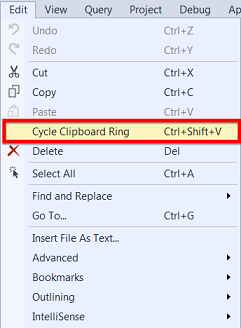
Cycle Clipboard ring in SQL Server Management Studio

“Cycle Clipboard” or “CTRL + SHIFT + V” is a short cut operation for pasting the items in the clipboard. This feature can paste last 20 items in the clipboard memory.

This is a very efficient method for developers to paste items not only the last copied, also any of the last 20 items. We need to just iterate through the clipboard memory by pressing CTRL+SHIFT+V until we get the desired item to be pasted.

Hope you enjoyed this tip, will reach you with more soon.

HASHBYTES for a large string in SQL Server

HASHBYTES function in SQL Server is used to hash the input using the algorithm specified.

This is a very efficient method to compare the string, for an example, lets compare the view definition between two different databases etc.

I do not really want to cover the usage or basic information of HASHBYTES in this post, but, a limitation and how to overcome the same. The first input parameter of HASHBYTES is the algorithm that needs to be used and the second one is the actual character or binary string that needs to be hashed.Now, the limitation is it will not accept the string more than 8000 bytes.

Lets quickly look at the example.


CREATE TABLE dbo.Test1 (c1 nvarchar(MAX));  
Insert into dbo.Test1 Select Replicate('a',4001) 
Select hashbytes('SHA1',c1) From dbo.Test1
Drop table dbo.Test1

The above code will throw an exception “String or binary data would be truncated.” as below:

To overcome the limitation, I have come up with a solution to break down the string into multiple and apply the hashing separately and later combined.

The script is as below:


Create FUNCTION [dbo].[GenerateHASHforLargeValue]
(   
    @TextValue nvarchar(max)
)

RETURNS varbinary(20)

AS
BEGIN

    if @TextValue = null
        return hashbytes('SHA1', 'null')

    Declare @TextLength as integer
	Declare @BinaryValue as varbinary(20)

    Set @TextLength = len(@TextValue)
	Declare @LenCount int  = 3500
    if @TextLength > @LenCount
    Begin
    ;With cte 
    as
    (
	Select substring(@TextValue,1, @LenCount) textval, @LenCount+1 as start, @LenCount Level,
               hashbytes('SHA1', substring(@TextValue,1, @LenCount)) hashval
	Union All 
	Select substring(@TextValue,start,Level), start+Level ,@LenCount  Level, 
               hashbytes('SHA1', substring(@TextValue,start,Level) + convert( varchar(20), hashval )) 
	From cte where Len(substring(@TextValue,start,Level))>0
    ) Select @BinaryValue = (Select Top 1 hashval From cte Order by start desc)
			return @BinaryValue
    End
    else
    Begin
	Set @BinaryValue = hashbytes('SHA1', @TextValue)
	return @BinaryValue
    End
    return null
END

If we apply the above function, then it will generate the hash code without the string truncation issue.

Hope this will help you whenever you may need to generate hash for larger strings!!!

Maximum stored procedure, function, trigger, or view nesting level exceeded (limit 32).

Hello friends, I don’t know what made me to write a blog, either it could be because i sit next to latheesh every day or inspired by reading his blogs daily, Any how, let me join with my Guru in sharing my experience.

we recently got a requirement to maintain the data integrity between two tables on a column which does not have any relationship between them.  Here is the scenario

we have two tables as listed below:


CREATE TABLE dbo.PEOPLE ( PEOPLE_ID INT ,EMPNAME VARCHAR(50), EMP_EMAIL VARCHAR(100))
CREATE TABLE dbo.USERS ( USERID INT ,USERNAME VARCHAR(50), USER_EMAIL VARCHAR(100))

INSERT INTO PEOPLE VALUES (1,'KIRAN','KIRANREDDY@GMAIL.COM')
INSERT INTO USERS VALUES (1,'KIRAN','KIRANREDDY2@GMAIL.COM')

I would like to maintain the same email in both tables for an employee, and email can be updated from either of these two tables.

So i have tried implementing the triggers on both tables when ever there is an update on email, I have to update the same email on both tables.

Here is the code I have implemented:


CREATE TRIGGER UPD_TRG_PEOPLE ON PEOPLE AFTER UPDATE AS
BEGIN
IF UPDATE(EMP_EMAIL)
UPDATE U SET USER_EMAIL=I.EMP_EMAIL FROM USERS U INNER JOIN INSERTED  I ON U.USERID=I.PEOPLE_ID 
END

CREATE TRIGGER UPD_TRG_USERS ON USERS AFTER UPDATE AS
BEGIN
IF UPDATE (USER_EMAIL)
UPDATE P SET P.EMP_EMAIL=I.USER_EMAIL FROM PEOPLE P INNER JOIN INSERTED  I ON P.PEOPLE_ID=I.USERID 
END

When I tried updating the email from people, It has resulted the following error:


Msg 217, Level 16, State 1, Procedure upd_trg_users, Line 3
Maximum stored procedure, function, trigger, or view nesting level exceeded (limit 32).

Solution :
Initially I have tried avoiding this error by changing the nested triggers Server Configuration Option


EXEC sp_configure 'show advanced options', 1;  
GO  
RECONFIGURE ;  
GO  
EXEC sp_configure 'nested triggers', 0 ;  
GO  
RECONFIGURE;  
GO

Even though this error has not appeared when I tried changing email, I feel that this is not an Ideal solution . As this is server level configuration which is applicable across  all databases. This may have other detrimental impact.

Hence i have found another solution with simple tweak in the trigger code:


CREATE TRIGGER UPD_TRG_PEOPLE ON PEOPLE AFTER UPDATE AS
BEGIN
IF UPDATE(EMP_EMAIL) AND  EXISTS (SELECT 1 FROM USERS   U INNER JOIN INSERTED I ON U.USERID = I.PEOPLE_ID WHERE I.EMP_EMAIL <> U.USER_EMAIL )
UPDATE U SET USER_EMAIL=I.EMP_EMAIL FROM USERS U INNER JOIN INSERTED  I ON U.USERID=I.PEOPLE_ID 
END

CREATE TRIGGER UPD_TRG_USERS ON USERS AFTER UPDATE AS
BEGIN
IF UPDATE (USER_EMAIL) AND  EXISTS (SELECT 1 FROM PEOPLE   P INNER JOIN INSERTED I ON P.PEOPLE_ID=I.USERID  WHERE P.EMP_EMAIL <> I.USER_EMAIL )
UPDATE P SET P.EMP_EMAIL=I.USER_EMAIL FROM PEOPLE P INNER JOIN INSERTED  I ON P.PEOPLE_ID=I.USERID 
END

Hope you enjoyed this post, please share your thoughts on the same.