Category: SQL

xp_servicecontrol in SQL Server

Problem Statement:

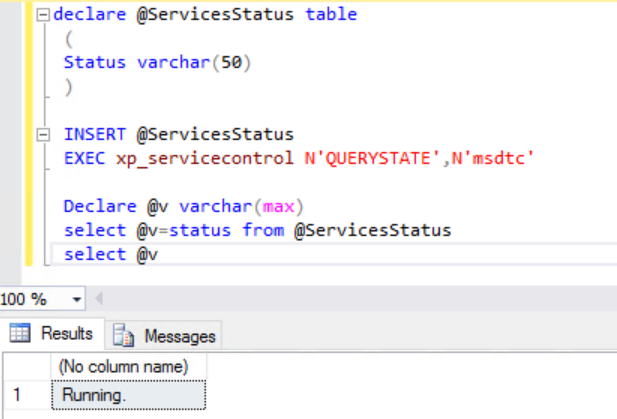
While I was automating a new server preparation step, one of my requirement is to make sure “MSDTC” service is up and running on the server. To enable this check, we can use an extended stored procedure – xp_servicecontrol. There are two parameters to this procedure as below.

It is important to understand that this extended procedure is an undocumented one which means, it cannot be used for a development purpose, this can be anytime removed from the product by Microsoft. However, this can be used as it warranted.

xp_servicecontrol @Action = N’Action’ @ServiceName = N’Service Name’

Action Description
start To start the service if it is not running. If the service is already in running state, an error is raised.
stop To stop the service if it is running. If the service is not running, an error is raised.
pause To pause a running service. An error is raised if the service is not running. Remember not all services can be paused.
continue To continue running a paused service. An error is raised if the serviced is not in paused state.
querystate To return the current state of the service.

Code:

declare @ServicesStatus table
 ( 
 Status varchar(50)
 )
    
 INSERT @ServicesStatus 
 EXEC xp_servicecontrol N'QUERYSTATE',N'msdtc'
    
 Declare @v varchar(max)
 select @v=status from @ServicesStatus
 select @v

I’d like to grow my readership. If you enjoyed this blog post, please share it with your friends!

How to Repair Database in Suspect Mode in SQL Server

Today, one of my colleague reached out to me that one of her database has gone into SUSPECT mode. She explained that while she was deploying the db changes, there was an unexpected shutdown happened on the server. While rebooting the server, it is observed the database has gone into SUSPECT mode.

Primary reasons when an SQL Server Database is marked in Suspect Mode

There may be many reasons for a db is getting into a SUSPECT mode. This is the worst case for any database can get as this would lead the database unusable.Here are few reasons I could think immediately, but there could be many other reason, feel free to add in the comment section if I miss anything.

    SQL Server Crash

    Database Files are inaccessible

    Improper shut down of SQL Server System

    Sudden Power Outage

    Hardware Failure etc.

Steps to Fix the SQL Server Database Suspect Mode Error

There are many articles on how to repair a SUSPECT db out there on a google search.

    Bring Database in EMERGENCY MODE

    Perform Consistency Check – DBCC CHECKDB

    Bring the Database in SINGLE_USER Mode with rollback immediate

    Take a Full Backup of the User Database

    Execute DBCC CHECKDB WITH REPAIR ALLOW DATA LOSS (Note: It might result in Data Loss)

    Bring the Database in MULTI_USER Mode for normal operations

Now, Let us look at our specific issue. Firstly, we tried to get this database in EMERGENCY mode with the below T-SQL.Unfortunately, we did end up with an exception given below which is clearly saying that this db has got a severe consistency issue which cannot be used further.
ALTER DATABASE dbname SET EMERGENCY
User does not have permission to alter database ‘dbname’, the database does not exist, or the database is not in a state that allows access checks.
How to drop SUSPECT database?

As we identified that this database has severely corrupted and it cannot be repair nor recovered, there is no way other than dropping the database. If you have backup of this database, you can always do restore from the latest valid backup (even up to the point in time). But unfortunately, in our case, it will not even allow you to drop and it would end up with the above same error message for DROP as well.

So, how do we drop this db? Its bit tricky and needs some outage of SQL Server (since one of the step is stopping the service).
    Stop the SQL Server service.

    Rename the file (MDF or LDF or both) of this database.

    Start the SQL Server service.

    Drop the database.

Caveat: The above method is recommended on non- production environments generally.

I’d like to grow my readership. If you enjoyed this blog post, please share it with your friends!

ISUNIQUEIDENTIFIER function in SQL Server

Today, I had a requirement to check a value can be converted as uniqueidentifier datatype or not, so quickly come up with the below function. Hope this would help you if you come across similar requirement in future.

Code:

CREATE FUNCTION DBO.ISUNIQUEIDENTIFIER
(
@InputVal nvarchar(50)
)  
RETURNS SmallInt AS  
BEGIN

RETURN 
	CASE WHEN SERVERPROPERTY('PRODUCTMAJORVERSION') >=11 THEN
		CASE WHEN TRY_CONVERT(UNIQUEIDENTIFIER,@InputVal) IS NOT NULL THEN 1 ELSE 0 END
	ELSE (
		CASE WHEN LEN(@InputVal) = 36 AND @InputVal LIKE
		   '[A-F0-9][A-F0-9][A-F0-9][A-F0-9]'
		+  '[A-F0-9][A-F0-9][A-F0-9][A-F0-9]'
		+ '-[A-F0-9][A-F0-9][A-F0-9][A-F0-9]'
		+ '-[A-F0-9][A-F0-9][A-F0-9][A-F0-9]'
		+ '-[A-F0-9][A-F0-9][A-F0-9][A-F0-9]'
		+ '-[A-F0-9][A-F0-9][A-F0-9][A-F0-9]'
		+  '[A-F0-9][A-F0-9][A-F0-9][A-F0-9]'
		+  '[A-F0-9][A-F0-9][A-F0-9][A-F0-9]' THEN 1 ELSE 0 END ) 
	END
END

I’d like to grow my readership. If you enjoyed this blog post, please share it with your friends!

Calendar Table in SQL Server

What is Calendar Table in SQL Server ?

Calendar Table is a custom/user table in SQL Server created for ease of users coding. At times, it is observed many programmers are struggling to write date/calendar queries. Also, it is observed online processing of these functionalities has its own performance impact. As mentioned, Calendar table would come in time to save programmers as those are pre populated and quite easy to use as well.

Calendar Table Code

Drop Table if exists Calendar;

Create Table Calendar 
(
	Date Date Primary Key, DayNo TinyInt, MonthNo TinyInt, YearNo SmallInt
	, WeekNo TinyInt, ISOWeekNo TinyInt,WeekDayNo TinyInt
	, DayName Varchar(10), MonthName Varchar(10), QuaterNo TinyInt
	, DayOfYearNo SmallInt, IsWeekEnd TinyInt
	, IsHoliday TinyInt, HolidayDescription nVarchar(500)
)

;with cteSeed  as ( Select 0 Seed union all Select Seed +1 From cteSeed where Seed <=100000)
,     cteDateDimenion as ( Select dateadd(Day,Seed,cast('1990-01-01' as date) ) Date from cteSeed)
,     cteCalendar as (
		Select 
		         Date,Day(Date)DayNo,Month(Date) MonthNo, Year(Date) YearNo 
			,DAtePArt(Week,Date) WeeKNo, DATEPART(ISO_WEEK,Date) ISOWeekNo,DATEPART(WEEKDAY,Date) WeekDayNo
			,DAteName(WEEKDAY,Date) DayName, DAteName(Month,Date) MonthName
			,DATEPART(Quarter,date) QuaterNo, DATEPART(DAYOFYEAR, date) DayOfYearNo
			,Case when DAteName(WEEKDAY,Date) in ('Saturday','Sunday') Then 1 Else 0 End 'IsWeekEnd'
			,Case When Day(Date)=1 and Month(Date)=1 Then '|New Year Day|' 
					When Day(Date)=25 and Month(Date)=12 Then '|Christmas Day|' 
					Else '' End  
			+ Case when DAteName(WEEKDAY,Date) in ('Saturday','Sunday') Then '|' 
			+  DAteName(WEEKDAY,Date) + '|' Else '' End as HoliDayDescription
		From cteDateDimenion )
Insert into Calendar (Date,DayNo,MonthNo,YearNo,WeekNo,ISOWeekNo,WeekDAyNo
,DayName,MonthName,QuaterNo,DayOfYearNo,IsWeekEnd,IsHoliday,HolidayDescription)
Select Date,DayNo,MonthNo,YearNo,WeekNo,ISOWeekNo,WeekDAyNo
,DayName,MonthName,QuaterNo,DayOfYearNo,IsWeekEnd,NULL,HolidayDescription From cteCalendar
OPTION (MAXRECURSION 0);

Update Calendar Set IsHoliday = Case when Len(HoliDayDescription) > 0 Then 1 Else 0 End 

Select * From Calendar

Assumptions:

1. The week day starts from Sunday.

2. Holiday list is specific to country, so the code above is as an example, feel free to add your specific holidays.

Use Cases:

How do you calculate business/working days between two dates?

Select count(1) as 'No. of Business Days' From Calendar 
where Date between '2020-01-01' and '2020-12-31' and IsHoliday != 1

How do I get Day name of first day of given month and year?

Select Date,DayName FRom Calendar where YearNo=2020 and MonthNo =11 and DayNo=1

I am sure, there many other use cases it would be helpful in real time, keep explore and feel free to make modification as required.

I’d like to grow my readership. If you enjoyed this blog post, please share it with your friends!

Error: Changes to the state or options of database ‘dbname’ cannot be made at this time. The database is in single-user mode, and a user is currently connected to it.

One of my colleague had an issue in dropping a database in her testing environment. She was not able to drop a database as she gets an error message (as below). Let me try to provide what she tried and ended up for every ones understanding.
alter database [dbname] set multi_user with rollback immediate
Drop database [dbname]

Error Message:

Msg 5064, Level 16, State 1, Line 1 Changes to the state or options of database ‘dbname’ cannot be made at this time. The database is in single-user mode, and a user is currently connected to it. Msg 5069, Level 16, State 1, Line 1 ALTER DATABASE statement failed.

Solution:

When I analysed, I could find that the database has gone into single user mode and there was an open session on this database.Since, its a testing environment, I had killed the open session from the database and tried to drop the database by putting it multi user as first step as below and it was successful.

USE master;

DECLARE @killSessions varchar(8000) = '';  
SELECT @killSessions = @killSessions + 'kill ' + CONVERT(varchar(5), spid) + ';'  
FROM master..sysprocesses  
WHERE dbid = db_id('dbname')
EXEC(@killSessions); 

alter database [dbname] set multi_user with rollback immediate
--Drop database [dbname] /*Only if need to be dropped*/

Hope this helps if you come across similar situations.

I’d like to grow my readership. If you enjoyed this blog post, please share it with your friends!