
Topics:
Strings in Python are identified as a continuous set of characters represented in the quotation marks.We can access subset of strings using Index [] operator.
Slicing methods:
str = ‘SQLZealots’
print(‘str = ‘, str)#first character
print(‘str[0] = ‘, str[0])#last character
print(‘str[-1] = ‘, str[-1])#slicing 2nd to 5th character
print(‘str[1:5] = ‘, str[1:5])#slicing 6th to 2nd last character
print(‘str[5:-2] = ‘, str[5:-2])
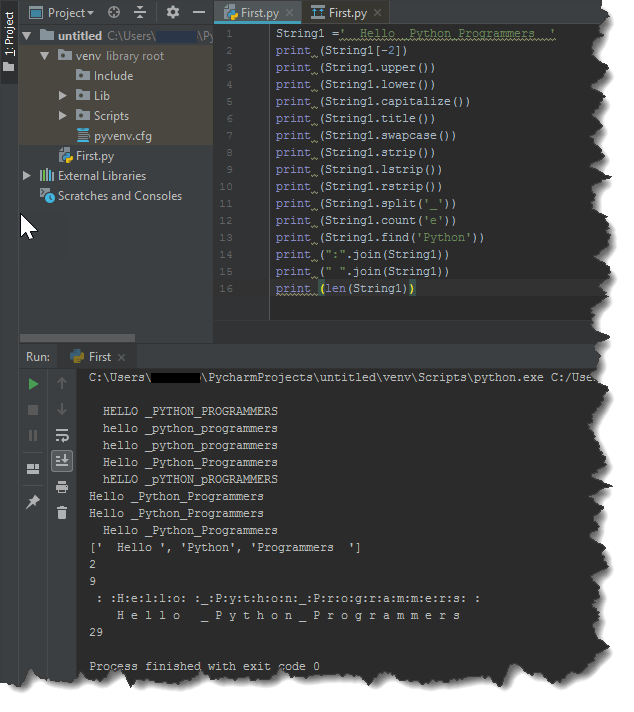
we have many built in methods with strings. I have listed couple of them and have shown the o/p of each method with an example.
string.upper() # get all-letters in uppercase
string.lower() # get all-letters in lowercase
string.capitalize() # capitalize the first letter
string.title() # capitalize the first letter of words
string.swapcase() # converts uppercase and lowercase
string.strip() # remove all white spaces
string.lstrip() # removes white space from left
string.rstrip() # removes white space from right
string.split() # splitting words
string.split(‘,’) # split words by comma
string.count(‘l’) # count how many times l is in the string
string.find(‘Wo’) # find the word Wo in the string
string.index(“Wo”) # find the letters Wo in the string
“:”.join(string) # add a : between every char
” “.join(string) # add a white space between every char
len(string) # find the length of the string
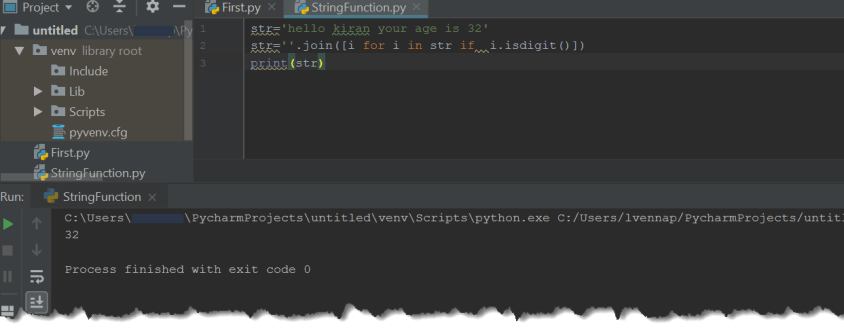
Lets write a small program ,to extract the Numbers only from a given string .
You can find the SQL version of the code from here.
Hope you enjoyed the post. Please share your comments .
See also
Lets begin our first program with some of String operations.Python has a built in String class named “str” with many handy features.String literals can be enclosed by either double or single quotes, although single quotes are more commonly used. if you want to use Multi line String then you have to use triple quotes.
First Program
Lets assign three different strings to three different variables and print them.
To start with, open Python IDLE under Start –>Programs
or Type Python Under Run prompt
IDLE is an Interactive interpreter, however, you can’t execute more than one statement at a time.
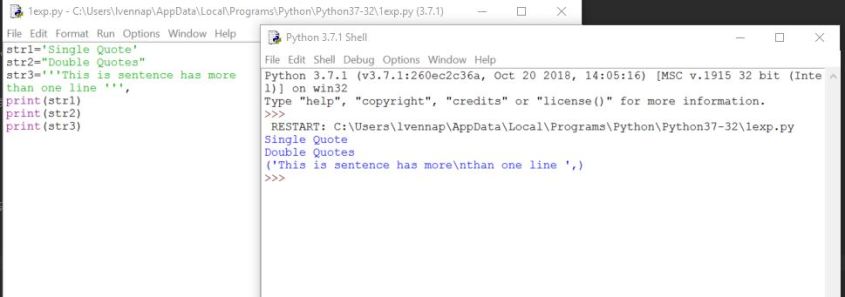
If you want to execute a multi line code program, just copy and paste the below code by opening a new file (CTRL+N) and save it. Then, you can execute the code in the file with ‘key board short cut F5’. output can be seen in the IDLE as shown below:
str1='Single Quote'
str2="Double Quotes"
str3='''This is sentence has more
than one line '''
print(str1)
print(str2)
print(str3)
If you face any error while executing the code or any doubts ,post your query in comments section , happy to assist you.
From today, we will start learning the most powerful and dynamic programming language popular for web development,big data, data science,and scripting.
Why Python:
1.You can create solutions quickly and others can understand them easily
2.Its an open source tool and has a great community when ever you are in trouble
3. No need of compilation
4.Cross platform,Runs anywhere, including Mac OS X, Windows, Linux, and Unix,
5.Comes with a large standard library that supports many common programming tasks such as connecting to web servers, searching text with regular expressions, reading and modifying files.
6.Is easily extended by adding new modules implemented in a compiled language such as C or C++.
You can find the more information here:
https://wiki.python.org/moin/BeginnersGuide/Overview
How to download Python:
You can download the Python Shell, using the below link
https://www.python.org/
Go to the above site, under downloads /Select OS type and down the latest version of Python ( 3.7.1)
After installing the exe, you can see the IDLE (Python 3.7) under Start->programs
or you can start the Python, by following the below steps
Go to Windows power shell program, and Type Python as shown below

If you want to come out of Python, Press Control+z and Enter
We have many IDEs through which we can write Python code, I have listed top 5
1.PyCharm
2.Spyder
3.Eclipse+PyDev
4.IDLE – Which we have downloaded from above website
5.Atom
You can find more details about this in the below site
https://realpython.com/python-ides-code-editors-guide/
lets Finish this blog post with Simple Hello world Program.
Open Python IDLE and type print

As you see python is a case sensitive language.
Thats it for now and we will continue to learn more about python in detail in upcoming posts.
 SQLZealots