Author: Lakshmi Kiran Reddy

First Program with Python:

Lets begin our first program with some of String operations.Python has a built in String class named “str” with many handy features.String literals can be enclosed by either double or single quotes, although single quotes are more commonly used. if you want to use Multi line String then you have to use triple quotes.

First Program

Lets assign three different strings to three different variables and print them.
To start with, open Python IDLE under Start –>Programs
or Type Python Under Run prompt

IDLE is an Interactive interpreter, however, you can’t execute more than one statement at a time.
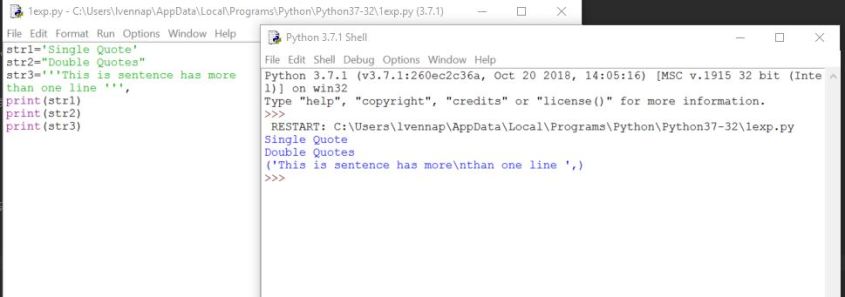
If you want to execute a multi line code program, just copy and paste the below code by opening a new file (CTRL+N) and save it. Then, you can execute the code in the file with ‘key board short cut F5’. output can be seen in the IDLE as shown below:

str1='Single Quote'
str2="Double Quotes"
str3='''This is sentence has more
than one line '''
print(str1)
print(str2)
print(str3)

 
First program

If you face any error while executing the code or any doubts ,post your query in comments section , happy to assist you.

Introduction to Python

From today, we will start learning the most powerful and dynamic programming language popular for web development,big data, data science,and scripting.

Why Python:
1.You can create solutions quickly and others can understand them easily
2.Its an open source tool and has a great community when ever you are in trouble
3. No need of compilation
4.Cross platform,Runs anywhere, including Mac OS X, Windows, Linux, and Unix,
5.Comes with a large standard library that supports many common programming tasks such as connecting to web servers, searching text with regular expressions, reading and modifying files.
6.Is easily extended by adding new modules implemented in a compiled language such as C or C++.

You can find the more information here:
https://wiki.python.org/moin/BeginnersGuide/Overview

How to download Python:

You can download the Python Shell, using the below link
https://www.python.org/
Go to the above site, under downloads /Select OS type and down the latest version of Python ( 3.7.1)

After installing the exe, you can see the IDLE (Python 3.7) under Start->programs
or you can start the Python, by following the below steps
Go to Windows power shell program, and Type Python as shown below
Open python via Windows powershell

If you want to come out of Python, Press Control+z and Enter

We have many IDEs through which we can write Python code, I have listed top 5

1.PyCharm
2.Spyder
3.Eclipse+PyDev
4.IDLE – Which we have downloaded from above website
5.Atom

You can find more details about this in the below site
https://realpython.com/python-ides-code-editors-guide/

lets Finish this blog post with Simple Hello world Program.

Open Python IDLE and type print

first Python program

As you see python is a case sensitive language.

Thats it for now and we will continue to learn more about python in detail in upcoming posts.

Error : MDF file cannot be overwritten in SQL Server

Today one of my colleague asked me that he was trying to replace an existing database with another database, while trying to do so , he has encountered the below error , though he was using same restore scripts which were working with out any error  in another machine of same configuration.

SQL Scripts used:

USE master
BACKUP DATABASE [Test_master] TO DISK = N'C:\Backups\Test_master.bak' WITH NOFORMAT, INIT, NAME = N'Test_master-Full Database Backup', SKIP, NOREWIND, NOUNLOAD,STATS = 10

ALTER DATABASE [Test] SET SINGLE_USER WITH ROLLBACK IMMEDIATE

RESTORE DATABASE [Test] FROM DISK = N'C:\Backups\Test_master.bak' WITH FILE = 1, NOUNLOAD, REPLACE, STATS = 10

Error Message:


Msg 1834, Level 16, State 1, Line 6 
The file 'C:\Program Files\Microsoft SQL Server\MSSQL10_50.MSSQLSERVER\MSSQL\DATA\Test_master.mdf' cannot be overwritten. It is being used by database 'Test_master'.

Msg 3156, Level 16, State 4, Line 6 File 'Test_master' cannot be restored to 'C:\Program Files\Microsoft SQL Server\MSSQL10_50.MSSQLSERVER\MSSQL\DATA\Test_master.mdf'. 
Use WITH MOVE to identify a valid location for the file.
Msg 1834, Level 16, State 1, Line 6
The file 'C:\Program Files\Microsoft SQL Server\MSSQL10_50.MSSQLSERVER\MSSQL\DATA\Test_master_log.ldf' cannot be overwritten. It is being used by database 'Test_master'.
Msg 3156, Level 16, State 4, Line 6 File 'Test_master_log' cannot be restored to 'C:\Program Files\Microsoft SQL Server\MSSQL10_50.MSSQLSERVER\MSSQL\DATA\Test_master_log.ldf'.
 Use WITH MOVE to identify a valid location for the file.
Msg 3119, Level 16, State 1, Line 6 Problems were identified while planning for the RESTORE statement. Previous messages provide details.
Msg 3013, Level 16, State 1, Line 6
RESTORE DATABASE is terminating abnormally.

Solution:

As the Error message clearly says that restore should happen WITH MOVE. We were able to restore Successfully by using WITH MOVE.

RESTORE DATABASE [Test] FROM DISK = N'C:\Backups\Test_master.bak' 
WITH MOVE 'Test_master' TO 'C:\Program Files\Microsoft SQL Server\MSSQL10_50.MSSQLSERVER\MSSQL\DATA\Test.mdf', 
MOVE 'Test_master_Log' TO 'C:\Program Files\Microsoft SQL Server\MSSQL10_50.MSSQLSERVER\MSSQL\DATA\Test_log.ldf', REPLACE, STATS = 10;

Output of this query:


14 percent processed.
23 percent processed. 
32 percent processed. 
42 percent processed. 
51 percent processed. 
61 percent processed. 
70 percent processed. 
80 percent processed. 
94 percent processed. 
100 percent processed. 
Processed 168 pages for database 'Test', file 'Test_master' on file 1. Processed 2 pages for database 'Test', file 'Test_master_log' on file 1. RESTORE DATABASE successfully processed 170 pages in 0.023 seconds (57.659 MB/sec).
To answer the question of my colleague on why he didn’t receive the same error on another machine with same set of scripts.

lets try with same scripts which he has used. i.e. WITH OUT using MOVE

USE master BACKUP DATABASE [Test_master] TO DISK = N'C:\Backups\Test_master.bak' WITH NOFORMAT, INIT, NAME = N'Test_master-Full Database Backup', SKIP, NOREWIND, NOUNLOAD,STATS = 10 

ALTER DATABASE [Test] SET SINGLE_USER WITH ROLLBACK IMMEDIATE 

RESTORE DATABASE [Test] FROM DISK = N'C:\Backups\Test_master.bak' WITH FILE = 1, NOUNLOAD, REPLACE, STATS = 10

As we could see that we are able to restore with No Error 🙂


4 percent processed.
23 percent processed. 
33 percent processed. 
42 percent processed.
52 percent processed.
61 percent processed.
71 percent processed.
80 percent processed. 
94 percent processed.
Processed 168 pages for database 'Test_master', 
file 'Test_master' on file 1. 100 percent processed.
Processed 1 pages for database 'Test_master', file 'Test_master_log' on file 1. BACKUP DATABASE successfully processed 169 pages in 0.021 seconds (62.872 MB/sec). 
14 percent processed. 
23 percent processed. 
33 percent processed. 
42 percent processed. 
52 percent processed. 
61 percent processed. 
80 percent processed. 
94 percent processed. 
100 percent processed. 
Processed 168 pages for database 'Test', file 'Test_master' on file 1. Processed 1 pages for database 'Test', file 'Test_master_log' on file 1. RESTORE DATABASE successfully processed 169 pages in 0.021 seconds (62.872 MB/sec).
Conclusion:

As long as the database being restored already has the same number and type of files to match those contained in the backup set being restored, the MOVE clause is not required.

Maximum stored procedure, function, trigger, or view nesting level exceeded (limit 32).

Hello friends, I don’t know what made me to write a blog, either it could be because i sit next to latheesh every day or inspired by reading his blogs daily, Any how, let me join with my Guru in sharing my experience.

we recently got a requirement to maintain the data integrity between two tables on a column which does not have any relationship between them.  Here is the scenario

we have two tables as listed below:


CREATE TABLE dbo.PEOPLE ( PEOPLE_ID INT ,EMPNAME VARCHAR(50), EMP_EMAIL VARCHAR(100))
CREATE TABLE dbo.USERS ( USERID INT ,USERNAME VARCHAR(50), USER_EMAIL VARCHAR(100))

INSERT INTO PEOPLE VALUES (1,'KIRAN','KIRANREDDY@GMAIL.COM')
INSERT INTO USERS VALUES (1,'KIRAN','KIRANREDDY2@GMAIL.COM')

I would like to maintain the same email in both tables for an employee, and email can be updated from either of these two tables.

So i have tried implementing the triggers on both tables when ever there is an update on email, I have to update the same email on both tables.

Here is the code I have implemented:


CREATE TRIGGER UPD_TRG_PEOPLE ON PEOPLE AFTER UPDATE AS
BEGIN
IF UPDATE(EMP_EMAIL)
UPDATE U SET USER_EMAIL=I.EMP_EMAIL FROM USERS U INNER JOIN INSERTED  I ON U.USERID=I.PEOPLE_ID 
END

CREATE TRIGGER UPD_TRG_USERS ON USERS AFTER UPDATE AS
BEGIN
IF UPDATE (USER_EMAIL)
UPDATE P SET P.EMP_EMAIL=I.USER_EMAIL FROM PEOPLE P INNER JOIN INSERTED  I ON P.PEOPLE_ID=I.USERID 
END

When I tried updating the email from people, It has resulted the following error:


Msg 217, Level 16, State 1, Procedure upd_trg_users, Line 3
Maximum stored procedure, function, trigger, or view nesting level exceeded (limit 32).

Solution :
Initially I have tried avoiding this error by changing the nested triggers Server Configuration Option


EXEC sp_configure 'show advanced options', 1;  
GO  
RECONFIGURE ;  
GO  
EXEC sp_configure 'nested triggers', 0 ;  
GO  
RECONFIGURE;  
GO

Even though this error has not appeared when I tried changing email, I feel that this is not an Ideal solution . As this is server level configuration which is applicable across  all databases. This may have other detrimental impact.

Hence i have found another solution with simple tweak in the trigger code:


CREATE TRIGGER UPD_TRG_PEOPLE ON PEOPLE AFTER UPDATE AS
BEGIN
IF UPDATE(EMP_EMAIL) AND  EXISTS (SELECT 1 FROM USERS   U INNER JOIN INSERTED I ON U.USERID = I.PEOPLE_ID WHERE I.EMP_EMAIL <> U.USER_EMAIL )
UPDATE U SET USER_EMAIL=I.EMP_EMAIL FROM USERS U INNER JOIN INSERTED  I ON U.USERID=I.PEOPLE_ID 
END

CREATE TRIGGER UPD_TRG_USERS ON USERS AFTER UPDATE AS
BEGIN
IF UPDATE (USER_EMAIL) AND  EXISTS (SELECT 1 FROM PEOPLE   P INNER JOIN INSERTED I ON P.PEOPLE_ID=I.USERID  WHERE P.EMP_EMAIL <> I.USER_EMAIL )
UPDATE P SET P.EMP_EMAIL=I.USER_EMAIL FROM PEOPLE P INNER JOIN INSERTED  I ON P.PEOPLE_ID=I.USERID 
END

Hope you enjoyed this post, please share your thoughts on the same.