Month: May 2021

Error Exception: Msg 3183, Level 16, State 2, Line 1 RESTORE detected an error on page (0:0) in database “dbname” as read from the backup set.

Recently we encountered the below issue while restoring a database. And we also observed the database has gone into “restoring” mode.

Msg 3183, Level 16, State 2, Line 1
RESTORE detected an error on page (0:0) in database “dbname” as read from the backup set.

The message is clear that there is something wrong on the backup set. There could be many issues related, but most likely reason would be the backup file would have got file corrupted.

You would likely to take a fresh backup and try with restore and in most cases it works good. So, the take away is “we should always validate our backups”. This is exactly what Paul S Randal explains with a survey and more details as here.

See Also

How to recover restoring database in SQL Server

How to recover “Recover Pending” database in SQL Server

If you enjoyed this blog post, feel free to share it with your friends!

Ready reckoner – Date Functions in SQL Server

This blog post tries to provide few of very common scenarios and its solutions that developers would come across in development phase.

Standard Date CONVERT formats

Declare @Date Datetime = GETDATE()
Select @Date
SELECT DATEADD(month, DATEDIFF(month, '', @date), '');

Select CONVERT(Varchar(25),@date,100) as 'Converted Value', 'Mon DD YYYY HH:MIAM (or PM)' as 'Converted Format' union all
Select CONVERT(Varchar(25),@date,1),'MM/DD/YY' union all
Select CONVERT(Varchar(25),@date,101),'MM/DD/YYYY' union all
Select CONVERT(Varchar(25),@date,2),'YY.MM.DD' union all
Select CONVERT(Varchar(25),@date,102),'YYYY.MM.DD' union all
Select CONVERT(Varchar(25),@date,3),'DD/MM/YY' union all
Select CONVERT(Varchar(25),@date,103),'DD/MM/YYYY' union all
Select CONVERT(Varchar(25),@date,4),'DD.MM.YY' union all
Select CONVERT(Varchar(25),@date,104),'DD.MM.YYYY' union all
Select CONVERT(Varchar(25),@date,5),'DD-MM-YY' union all
Select CONVERT(Varchar(25),@date,105),'DD-MM-YYYY' union all
Select CONVERT(Varchar(25),@date,6),'DD Mon YY' union all
Select CONVERT(Varchar(25),@date,106),'DD Mon YYYY' union all
Select CONVERT(Varchar(25),@date,7),'Mon DD, YY' union all
Select CONVERT(Varchar(25),@date,107),'Mon DD, YYYY' union all
Select CONVERT(Varchar(25),@date,108),'HH:MM:SS' union all
Select CONVERT(Varchar(25),@date,109),'Mon DD YYYY HH:MI:SS:MMMAM (or PM)' union all
Select CONVERT(Varchar(25),@date,10),'MM-DD-YY' union all
Select CONVERT(Varchar(25),@date,110),'MM-DD-YYYY' union all
Select CONVERT(Varchar(25),@date,11),'YY/MM/DD' union all
Select CONVERT(Varchar(25),@date,111),'YYYY/MM/DD' union all
Select CONVERT(Varchar(25),@date,12),'YYMMDD' union all
Select CONVERT(Varchar(25),@date,112),'YYYYMMDD' union all
Select CONVERT(Varchar(25),@date,113),'DD Mon YYYY HH:MM:SS:MMM(24h)' union all
Select CONVERT(Varchar(25),@date,114),'HH:MI:SS:MMM(24H)' union all
Select CONVERT(Varchar(25),@date,120),'YYYY-MM-DD HH:MI:SS(24h)' union all
Select CONVERT(Varchar(25),@date,121),'YYYY-MM-DD HH:MI:SS.MMM(24h)' union all
Select CONVERT(Varchar(25),@date,126),'YYYY-MM-DDTHH:MM:SS:MMM' union all
Select CONVERT(nVarchar(25),@date,130),'DD Mon YYYY HH:MI:SS:MMMAM' union all
Select CONVERT(Varchar(25),@date,131),'DD/MM/YYYY HH:MI:SS:MMMAM'

How to separate date from a string

Create table testing(id int identity(1,1), enddate varchar(40))

insert into testing values('End Date: 04/30/2021')
insert into testing values('06/30/2027')
insert into testing values('something something something 06/30/2027')
insert into testing values('13.a')
insert into testing values('Section 23')
insert into testing values('End Date: 06/30/2027')
insert into testing values('End Date: 12/31/2016 a as asdadasd')

;With cte as
(
select ID, enddate,
SUBSTRING(enddate, patindex('%[0-9][0-9]/[0-9][0-9]/[0-9][0-9]%', enddate), 10) AS Actualdate
FROM testing
)
select id,enddate,
case when Isdate(right(Actualdate,10)) = 1 then Actualdate
else null end Actualdate from cte

Drop table testing

How to calculate age from a date

create table students(student_id int,DOB date)

Insert into students Values(1,'19790111'),(2,'19790219'),(3,'20200408')

Select student_id,DOB,Cast(getdate() as date),
cast((DATEDIFF(m, DOB, GETDATE())/12) as varchar) as years,
cast((DATEDIFF(m, DOB, GETDATE())%12) as varchar) as ' Months',
cast((DATEDIFF(d, DOB, GETDATE())%365) as varchar) as ' Days'
From students

Drop table students

If you enjoyed this blog post, feel free to share it with your friends!

Few use cases of splitting strings in SQL Server

Its a very frequent question in forums on splitting strings with various forms of data. This blog post will try to get few of use cases and provide solutions to those scenarios in a simpler way.

Case 1: Split a full name to first name & last name

This case is a very common one scenario, a full name in a column needs to be split into two as First Name and Last Name.

-- DDL and sample data population, start
 DECLARE @tbl TABLE (ID INT IDENTITY PRIMARY KEY,  FullName varchar(200));
 INSERT INTO @tbl (FullName) VALUES
 ('Vigneshwaran Arunachalam'), 
 ('Murugan Mani'), 
 ('Dharani Kumar Rajput'), 
 ('Uday Talluri'), 
 ('Soundarya Lakshmi'), 
 ('Noname'), 
 ('Latheesh Nedumpurath Kalappurakkal');
 

 -- DDL and sample data population, end
 DECLARE @separator CHAR(1) = SPACE(1);
    
 ;WITH rs AS
 (
  SELECT * 
  , TRY_CAST('<root><r>' + 
  REPLACE(FullName, @separator, '</r><r>') + 
  '</r></root>' AS XML) AS xmldata
  FROM @tbl
 )
 SELECT ID, rs.FullName 
  , rs.xmldata.value('(/root/r[1]/text())[1]', 'VARCHAR(30)') AS firstName
  , rs.xmldata.query('data(/root/r[position() gt 1]/text())').value('.' , 'VARCHAR(100)') AS lastName
 FROM rs;

Result

Case 2: Multi split a string to columns

This is a multi split scenario, where you would like to divide your single string into multiple columns according to the key name in the string. if there are no key then it has to consider NULL value while preparing in a tabular format.

-- DDL and sample data population, start
 DECLARE @tbl table (ID int, Comments VARCHAR(500));
 INSERT INTO @tbl VALUES 
 (1, 'StartDate: 01/01/2000 || EndDate: 01/31/2001 || Position: Manager || Salary: 100K || Age:50 || IsActive: No'),
 (2, 'StartDate: 01/01/2002 || Position: Sr.Manager || Salary: 150K || Age:55 || IsActive: Yes'),
 (3, 'StartDate: 01/01/2001 || Position: Director || Age:55');
 -- DDL and sample data population, end
    
 ;WITH rs AS
 (
  SELECT * 
  , '[{"' + REPLACE(REPLACE(REPLACE(Comments
  , ':', '":"')
  , SPACE(1), '')
  , '||', '","') + '"}]' AS jsondata
  FROM @tbl
 )
 SELECT rs.ID, rs.comments, report.*
 FROM rs
  CROSS APPLY OPENJSON(jsondata)
 WITH 
 (
     [StartDate] VARCHAR(10) '$.StartDate'
     , [EndDate] VARCHAR(10) '$.EndDate'
     , [Position] VARCHAR(30) '$.Position'
     , [Salary] VARCHAR(10) '$.Salary'
     , [Age] INT '$.Age'
     , [IsActive] VARCHAR(3) '$.IsActive'
 ) AS report;

Result

I will be adding more cases as I come across in future. I would like to request you to share your thoughts on any alternatives and any new use cases you would like to add to this list.

See Also:

String_Split function in SQL Server 2016

If you enjoyed this blog post, feel free to share it with your friends!

How to identify the list of folders and files which has been modified on given date using SQL Server

In some situations you may face scenarios like “you need to know all the files and folders modified recently or modified after the specific date range to check and remove unnecessary files\folders from the Drive”, for this scenario you can make use of this script.

Pre-requisites:-

  1. PowerShell
  2. Access to “xp_cmdshell”

The below is the SQL stored procedure which uses 2 parameters (“Drive\Folder path” and “Date”), Date filter is an optional parameter, if you don’t supply any values, by default it will consider the files\folders which are modified from Yesterday (please note that you can change the default date filter value based on your requirement)

--EXEC [SP_Get_Directory_FilesInfo]  'D:\temp\scripts\','2020-04-01'
--EXEC [SP_Get_Directory_FilesInfo]  'D:\temp\scripts\'
Create or Alter PROCEDURE [dbo].[SP_Get_Directory_FilesInfo] 
(@path nvarchar(4000),@yyyymmdd date=NULL) AS 
BEGIN

declare @pscript nvarchar(4000)

IF @yyyymmdd IS Null
	SET @yyyymmdd= cast(DATEADD(DD,-1,getdate()) as date)

if right(@path,1)='\'
	set @path = substring(@path,1,len(@path)-1)

--To avoid using of system drive--
IF (Charindex('C:\',@path)>0  or charindex('c$',@path)>0) BEGIN
	Select 'Alert Message!! C-Drive is not supported' Return;
END

--PS Script--
set @pscript ='powershell.exe -ExecutionPolicy Unrestricted -command "Get-ChildItem -Recurse -Path "' + @path +
'" | Where-Object LastWriteTime -ge "' + CAST(@yyyymmdd  AS VARCHAR) +
'" | select-Object FullName, @{Name="''LastWriteTime''"; Expression={$_.LastWriteTime.ToString("''yyyy-MM-dd HH:mm:ss''")}}, Mode | Export-CSV -NoTypeInformation -path "' + @path + '\Outputfile.csv"" '

Exec xp_cmdshell @pscript, NO_OUTPUT;

drop table if exists tblcsv_data
create table tblcsv_data (aa nvarchar(max),bb nvarchar(max), mode nvarchar(100))

declare @c nvarchar(4000), @d nvarchar(4000)
set @c = @path + '\Outputfile.csv'

EXEC('
BULK INSERT tblcsv_data 
FROM ''' + @c +'''
WITH
(
    FIRSTROW = 2,
    FIELDTERMINATOR = ''","'',  --CSV field delimiter
    ROWTERMINATOR = ''\n'',   --Use to shift the control to next row
    TABLOCK
);
')

set @d = 'del '+ @c
Exec xp_cmdshell @d, NO_OUTPUT;

delete from tblcsv_data where aa like '%Outputfile.csv%'

drop table if exists tbl_FilesInfo
create table tbl_FilesInfo (id bigint identity(1,1), 
FileNames nvarchar(max), 
LastModified Datetime,
isDirectory bit null
)

insert into tbl_FilesInfo (FileNames,LastModified,isDirectory)
select replace(aa,'"',''),
replace(bb,'"',''),
case when mode='d-----"' then 1 else 0 end isDirectory
from tblcsv_data

if not exists (select 1 from tbl_FilesInfo) Begin
	Select 'Please Check!! There are no files having Date Range greater than [' + CAST(@yyyymmdd  AS VARCHAR) + ']' as Status
	return;
	END

select  FileNames,
LastModified,
isDirectory
from tbl_FilesInfo
order by isDirectory desc,
LastModified desc

END

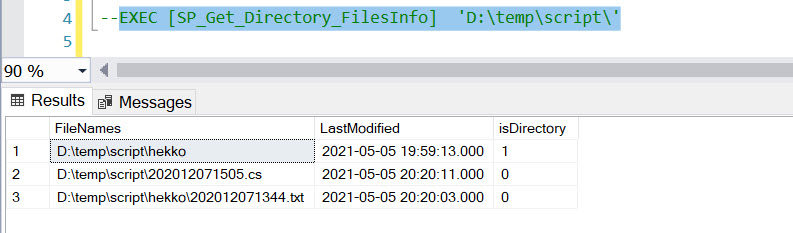
Sample Input Folder:-

Execution of SP with 2 Parameters:-

Execution of SP without Date Parameter:-

In addition to the above, here is the some example of PS scripts which you can directly use it in PowerShell and get the same desired results.

#PS Script 1 output will be displayed in powershell window
Get-ChildItem -Recurse -Path "C:\temp\script" | Where-Object LastWriteTime -ge "2021-04-02" | select-Object FullName, @{Name="''LastWriteTime''"; Expression={$_.LastWriteTime.ToString("''yyyy-MM-dd HH:mm:ss''")}}, @{Name = "Isdirectory"; Expression = {$_.Mode -replace "d-----","1" -replace "-a----","0"}}

#PS Script 2 output will be saved in .csv file
#If you want to save results to text file, please change export file name as Outputfile.txt
Get-ChildItem -Recurse -Path "C:\temp\script" | Where-Object LastWriteTime -ge "2021-04-02" | select-Object FullName, @{Name="''LastWriteTime''"; Expression={$_.LastWriteTime.ToString("''yyyy-MM-dd HH:mm:ss''")}}, @{Name = "Isdirectory"; Expression = {$_.Mode -replace "d-----","1" -replace "-a----","0"}} | Export-CSV "C:\temp\script\Outputfile.csv"

If you enjoyed this blog post, please feel free to share it with your friends!

@@ERROR & @@TOTAL_ERRORS in SQL Server

@@ERROR

This variable is used for a basic error handling mechanism in SQL Server earlier days (before SQL 2005). This variable is used to capture the error code of an immediate previous statement if any. If there is an error, it will return the error code else 0. It is to be noted that any statement will reset the value including the same statement. So ideally, If you want to capture for a longer scope, the immediate @@ERROR code can be assigned to a variable.

Let us quickly look at a simple example as below.

Select 1/0
Select @@ERROR, @@TOTAL_ERRORS

In the above code, the first statement is throwing the below error.

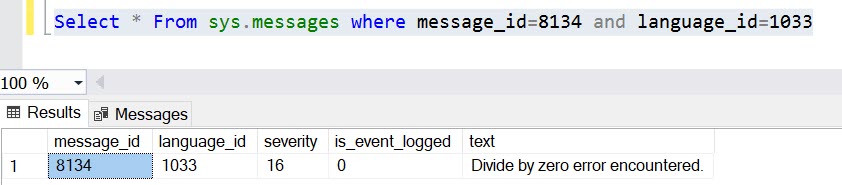
Msg 8134, Level 16, State 1, Line 1
Divide by zero error encountered.

And the first @@ERROR statement will capture the error code, where as while executing the second @@ERROR, the value is rest to 0.

Once you captured the error code, we can verify the message it later from sys.messages system table as well.

@@TOTAL_ERRORS

This variable sounds similar to the above one, however, this has no relation with @@ERROR. This variable returns the number of disk write errors encountered by SQL Server since SQL Server last started/restarted.

I could not see lots of use cases if this variable. If you come across and already experienced, please feel free share those information as a comment.

If you enjoyed this blog post, please feel free to share it with your friends!