Month: August 2019

Cleanup of Load Runner Test data from SQL Server

Here is a script to purge the Load test data from your load runner database. This would be handy at times like running of disk space or performance issues related to load runner etc.


--Provide your Load runner database name
USE <<Loadrunner DBName>>
Create proc SQLZealot_CleanupTestData  (@DeleteDateUpto Datetime)
with encryption
as
Begin

	If not exists(Select 1 From sys.tables where name = 'TempTobeDeletedLoadRecords')
		Select LoadtestrunID into TempTobeDeletedLoadRecords from Loadtestrun (nolock) where StartTime < @DeleteDateUpto

	Declare @LoadtestrunID bigint
	While exists(Select 1 From TempTobeDeletedLoadRecords )
	Begin
		Set @LoadtestrunID = (Select Top 1 Loadtestrunid from TempTobeDeletedLoadRecords ORder by 1 asc)
		Exec Prc_DeleteLoadTestRun @Loadtestrunid
		Delete TempTobeDeletedLoadRecords Where Loadtestrunid = @LoadtestrunID
	End

	Drop Table TempTobeDeletedLoadRecords

End

How to identify Scans (Table/index) from cached plan in SQL Server

Today, we will quickly see how to identify the scans happening on SQL Server. I had to analyse a test SQL Server environment to identify performance bottlenecks. So, the team was looking for a way to get the scans happening on their server to further optimize and confirm the performance.

Here is a small script I created to understand the Scans on the server. Please note that I divided the script into two parts,
1. To generate a snapshot of the cached plans into a table called – Temp_CacheDump_Analyser
2. To query the Temp_CacheDump_Analyser table for scan operators

This way, even if you want to query it multiple times for different reasons, you can query the cache dump table instead of cached plan tables.

–Generate the snapshot with the required fields


SELECT usecounts,cacheobjtype,objtype,query.text
 ,executionplan.query_plan into Temp_CacheDump_Analyser
 FROM sys.dm_exec_cached_plans
 OUTER APPLY sys.dm_exec_sql_text(plan_handle) as query
 OUTER APPLY sys.dm_exec_query_plan(plan_handle) as executionplan
 WHERE [text] NOT LIKE '%sys%'
 AND cacheobjtype ='compiled plan' 

–Query the row data to identify scans on your SQL Server

;WITH XMLNAMESPACES(DEFAULT N'http://schemas.microsoft.com/sqlserver/2004/07/showplan'),
CachedPlans
(
	ParentOperationID, OperationID, PhysicalOperator, LogicalOperator, EstimatedCost, EstimatedIO,
	EstimatedCPU, EstimatedRows, QueryText, QueryPlan, CacheObjectType, ObjectType
)
AS
(
SELECT	RelOp.op.value(N'../../@NodeId', N'int') AS ParentOperationID,
		RelOp.op.value(N'@NodeId', N'int') AS OperationID,
		RelOp.op.value(N'@PhysicalOp', N'varchar(50)') AS PhysicalOperator,
		RelOp.op.value(N'@LogicalOp', N'varchar(50)') AS LogicalOperator,
		RelOp.op.value(N'@EstimatedTotalSubtreeCost ', N'float') AS EstimatedCost,
		RelOp.op.value(N'@EstimateIO', N'float') AS EstimatedIO,
		RelOp.op.value(N'@EstimateCPU', N'float') AS EstimatedCPU,
		RelOp.op.value(N'@EstimateRows', N'float') AS EstimatedRows,
		qp.TEXT AS QueryText, qp.query_plan AS QueryPlan,
		qp.cacheobjtype AS CacheObjectType, qp.objtype AS ObjectType
	FROM Temp_CacheDump_Analyser qp
	CROSS APPLY qp.query_plan.nodes(N'//RelOp') RelOp (op)
)
SELECT	QueryPlan, ParentOperationID, OperationID, PhysicalOperator, LogicalOperator, QueryText,
		CacheObjectType, ObjectType, EstimatedCost, EstimatedIO, EstimatedCPU, EstimatedRows
FROM CachedPlans
	WHERE CacheObjectType = N'Compiled Plan'
		AND	(PhysicalOperator = 'Clustered Index Scan' OR PhysicalOperator = 'Table Scan'
		OR PhysicalOperator = 'Index Scan' OR PhysicalOperator = 'Lookup')

The caveat is the above results are based on the data available at the point in time in the cache. There may be sceanrios these data gets flushed, so the data should be collected and analysed in a regular way that means, its not a one time activity.

Hope, you enjoyed this post, please share your thoughts and feedback.

XACT_ABORT in SQL Server

Today’s post will explain XACT_ABORT in SQL Server. An efficient way of error handling before SQL Server 2005.Post SQL Server 2005, there is a new feature included in SQL Server, TRY… CATCH. But, I would still think there is a good amount of use cases and a great value addition where XACT_ABORT is important in SQL Server. Let us cover few things in the below sections.

Whats the significance of XACT_ABORT in SQL Server?

On a run time error scenario, XACT_ABORT On settings will terminate and rollback the entire transaction. XACT_ABORT does not have any significance on compile or parse time exceptions.

How do we set up XACT_ABORT in SQL Server?

A simple and common method is to set using T-SQL as below:

SET XACT_ABORT {ON/OFF}

Another option is at Database Engine level as below:

EXEC sp_configure 'user options', 16384
RECONFIGURE WITH OVERRIDE

You can refer more about this here.

We can always understand the current setting of XACT_ABORT as below:

DECLARE @XACT_ABORT VARCHAR(3)  = 'OFF'
IF ( (16384 & @@OPTIONS) = 16384 ) SET @XACT_ABORT = 'ON';  
SELECT @XACT_ABORT AS XACT_ABORT; 

Whats the scope if XACT_ABORT?

— SET XACT_ABORT ON/OFF is applied ONLY for the session
— By default XACT_ABORT is OFF

— XACT_ABORT ON, Try…Catch & Transaction

As mentioned earlier, by default XACT_ABORT is OFF by default and if there are any issue in one of transaction of a batch, the transaction alone gets failed as below:
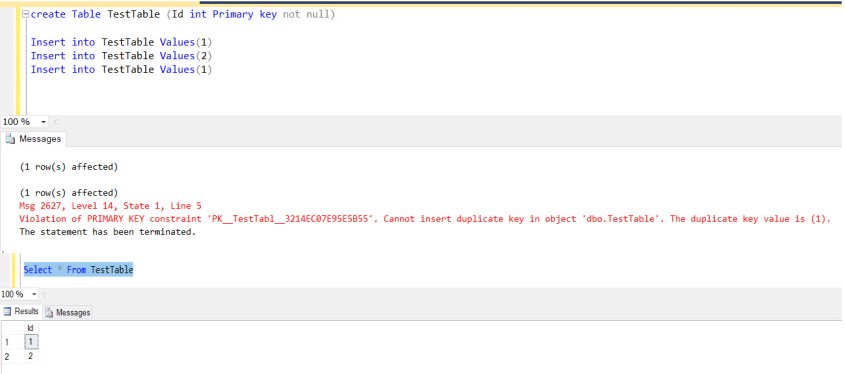
There is no difference even with XACT_ABORT ON in similar case as below:

However, There is a difference in XACT_ABORT when its applied with a transaction. If there are any issue in a batch, the entire batch gets terminated as below:(please note, there is no explicit rollback applied in the example, still no transactions are committed.)

— XACT_ABORT, Transaction and Object Resolution

This is interesting to know about the fact that if there are any failures, the transaction becomes open without XACT_ABORT. If we specify the XACT_ABORT ON, then the transaction is terminated automatically.

Finally, How to preserve XACT_ABORT state in SQL Server?

Sometimes, preserving the XACT_ABORT is a requirement for many of us. As we discussed, we can use @@options and a bit operation with the corresponding user options value to preserve the value. Here is a small example, how can this be achieved as below:

Create procedure Preserve_XACTABORT_Settings
as
Begin

	Declare @Options Bigint
	SET @Options = @@options

	--To know the setting of XACT_ABORT for testing purpose
	DECLARE @XACT_ABORT VARCHAR(3)  = 'OFF'
	IF ( (16384 & @@OPTIONS) = 16384 ) SET @XACT_ABORT = 'ON' Else Set @XACT_ABORT = 'OFF'
	SELECT @XACT_ABORT AS XACT_ABORT; 

	SET XACT_ABORT ON

	/*

	You can put your actual procedure implementation

	*/

	--To know the setting of XACT_ABORT for testing purpose
	IF ( (16384 & @@OPTIONS) = 16384 ) SET @XACT_ABORT = 'ON' Else Set @XACT_ABORT = 'OFF' 
	SELECT @XACT_ABORT AS XACT_ABORT; 	


	--Preserve the XACT_ABORT settings
	IF ( (@OPTIONS & 16384 ) = 0 ) 
		SET XACT_ABORT OFF

	--To know the setting of XACT_ABORT for testing purpose
	IF ( (16384 & @@OPTIONS) = 16384 ) SET @XACT_ABORT = 'ON' Else Set @XACT_ABORT = 'OFF'
	SELECT @XACT_ABORT AS XACT_ABORT; 	

End

Hope, you enjoyed this post, share your thoughts and feedback as always!