Tag: SQL Server

How to identify Missing Index from Cached Plan in SQL Server

Here, we are going to find a simple and very efficient way to identify missing indexes in SQL Server. The method is used to query cached plan in SQL Server and identify the missing index information from the Cached plan.

Please have a look and share your thoughts on the same.

Script


;WITH XMLNAMESPACES
   (DEFAULT 'http://schemas.microsoft.com/sqlserver/2004/07/showplan')
SELECT 
	query_plan, n.value('(@StatementText)[1]', 'VARCHAR(4000)') AS sql_text,
	n.value('(//MissingIndexGroup/@Impact)[1]', 'FLOAT') AS impact,
	DB_ID(REPLACE(REPLACE(n.value('(//MissingIndex/@Database)[1]', 'VARCHAR(128)'),'[',''),']','')) AS database_id,
	OBJECT_ID(n.value('(//MissingIndex/@Database)[1]', 'VARCHAR(128)') + '.' +
    n.value('(//MissingIndex/@Schema)[1]', 'VARCHAR(128)') + '.' +
    n.value('(//MissingIndex/@Table)[1]', 'VARCHAR(128)')) AS OBJECT_ID,
	n.value('(//MissingIndex/@Database)[1]', 'VARCHAR(128)') + '.' +
    n.value('(//MissingIndex/@Schema)[1]', 'VARCHAR(128)') + '.' +
    n.value('(//MissingIndex/@Table)[1]', 'VARCHAR(128)') AS statement,
	(   SELECT DISTINCT c.value('(@Name)[1]', 'VARCHAR(128)') + ', '
		FROM n.nodes('//ColumnGroup') AS t(cg)
		CROSS APPLY cg.nodes('Column') AS r(c)
		WHERE cg.value('(@Usage)[1]', 'VARCHAR(128)') = 'EQUALITY' FOR  XML PATH('')) AS equality_columns,
	(  SELECT DISTINCT c.value('(@Name)[1]', 'VARCHAR(128)') + ', '
		FROM n.nodes('//ColumnGroup') AS t(cg)
		CROSS APPLY cg.nodes('Column') AS r(c)
		WHERE cg.value('(@Usage)[1]', 'VARCHAR(128)') = 'INEQUALITY' FOR  XML PATH('')) AS inequality_columns,
	(  SELECT DISTINCT c.value('(@Name)[1]', 'VARCHAR(128)') + ', '
		FROM n.nodes('//ColumnGroup') AS t(cg)
		CROSS APPLY cg.nodes('Column') AS r(c)
		WHERE cg.value('(@Usage)[1]', 'VARCHAR(128)') = 'INCLUDE' FOR  XML PATH('')) AS include_columns,
		tab.text,ObjectName
FROM
(
   SELECT query_plan,text,ObjectName   FROM (
			SELECT usecounts,cacheobjtype,objtype,query.text,object_name(query.objectid) ObjectName ,executionplan.query_plan
			FROM sys.dm_exec_cached_plans
			OUTER APPLY sys.dm_exec_sql_text(plan_handle) as query
			OUTER APPLY sys.dm_exec_query_plan(plan_handle) as executionplan
			WHERE [text] NOT LIKE '%sys%'  AND cacheobjtype ='compiled plan' ) qs
   WHERE qs.query_plan.exist('//MissingIndex')=1
) AS tab (query_plan,text,ObjectName)

CROSS APPLY query_plan.nodes('//StmtSimple') AS q(n)
WHERE n.exist('QueryPlan/MissingIndexes') = 1

How to Identify Referenced Tables(Child) recursively and its Keys for a Parent Table in SQL Server

Question:

Identify foreign key references OR Referenced Tables and its key(s) for a Parent table in SQL Server.

Script:


;WITH CTE AS
(

	SELECT OBJECT_NAME(PARENT_OBJECT_ID) CHILDTABLE, TYPE,NAME,OBJECT_NAME(REFERENCED_OBJECT_ID) PARENTTABLE,
	DELETE_REFERENTIAL_ACTION_DESC, UPDATE_REFERENTIAL_ACTION_DESC FROM SYS.FOREIGN_KEYS
	
	--SEARCH TABLENAME (PARENT TABLE)
	WHERE OBJECT_NAME(REFERENCED_OBJECT_ID) = 'ParentTable Name'

	UNION ALL

	SELECT OBJECT_NAME(PARENT_OBJECT_ID), A.TYPE,A.NAME,OBJECT_NAME(REFERENCED_OBJECT_ID),
	A.DELETE_REFERENTIAL_ACTION_DESC, A.UPDATE_REFERENTIAL_ACTION_DESC FROM SYS.FOREIGN_KEYS A
	INNER JOIN CTE B ON OBJECT_NAME(A.REFERENCED_OBJECT_ID) = B.CHILDTABLE
	WHERE PARENTTABLE !=  CHILDTABLE
	
)
,CTE1 AS
(
	SELECT DISTINCT A.*,B.COLUMN_NAME  FROM CTE A
	INNER JOIN INFORMATION_SCHEMA.CONSTRAINT_COLUMN_USAGE B
		ON A.NAME = B.CONSTRAINT_NAME
)
SELECT 
	DISTINCT CHILDTABLE,PARENTTABLE,
	KEY_COLUMNS=  REPLACE(
					(
					SELECT A.COLUMN_NAME AS [data()]
					FROM CTE1 A
					WHERE A.NAME = B.NAME AND A.CHILDTABLE = B.CHILDTABLE AND A.PARENTTABLE = B.PARENTTABLE
					FOR XML PATH ('') )
					, ' ', ',') 
FROM CTE1 B OPTION(MAXRECURSION 32767)

PARSENAME in SQL Server: a Powerful function

Introduction:
PARSENAME is one of my favourite functions in SQL Server. But, unfortunately, I could not see many people using this function efficiently.So, I thought of sharing some of its usages here with you.

PARSENAME function can be used to retrive specified part of a string that has four parts separated with DOT(.). This function can be used efficiently to retrive the each part name with four part names like fully qualified objectnames.


--Database four part Object name Usage
create Table Test_ParseName(ObjectName Varchar(100))

Insert into Test_ParseName Values('SER1.DB1.SCH1.TAB1'),('SER2.DB2.SCH2.TAB2')

Select PARSENAME(ObjectName,4) 'SERVERNAME',PARSENAME(ObjectName,3) 'DBNAME',PARSENAME(ObjectName,2) 'SCHEMANAME',PARSENAME(ObjectName,1) 'OBJNAME'
From Test_ParseName

Drop table Test_ParseName

The above is a typical example used in Books online(BOL).

Here, I would like to introduce some more scenarios where we can efficiently use PARSENAME function.

1. To separate IPAdress Sections and for its validation:
Note: IPAddress validation is not a fool-proof solution, however, used to showcase a typical usage of PARSENAME.


create Table Test_ParseName(IPAddress Varchar(100))

Insert into Test_ParseName Values('10.123.123.234'),('10.234.12.123'),('101.123.234.12.123'),('10.234.12'),('10.234.12.')

Select IPAddress,
		PARSENAME(IPAddress,4) 'SECTION1',PARSENAME(IPAddress,3) 'SECTION2',
		PARSENAME(IPAddress,2) 'SECTION3',PARSENAME(IPAddress,1) 'SECTION4',
		/*Another Usage If we want to check the test is satisfying the 4 part naming separated by "."
		Please note that it does not cover the entire validation of IPAdress*/
		Case when (PARSENAME(IPAddress,1) is not null and PARSENAME(IPAddress ,4) is not null) 
				Then 'Satisfied four part' Else 'Invalid format' End
From Test_ParseName

Drop table Test_ParseName

PARSENAME_image2

2. Another example with REPLACE function:
PARSENAME can be used along with REPLACE in many places. Try out the below;the below sample will replace “-” character with “.” and use PARSENAME to separate the four part string easily.


create Table Test_ParseName(string Varchar(100))

Insert into Test_ParseName Values('Check-function-usage-efficiently'),('Check-function-usage'),('Check-function'),('Check'),('Check-function-usage-efficiently-failed')

;With cte_Test_parsename as
(Select REPLACE(string,'-','.') stringmodified From Test_Parsename)

Select stringmodified,
		PARSENAME(stringmodified,4) 'SECTION1',PARSENAME(stringmodified,3) 'SECTION2',
		PARSENAME(stringmodified,2) 'SECTION3',PARSENAME(stringmodified,1) 'SECTION4'
From cte_Test_parsename

Drop table Test_ParseName

PARSENAME_image3

Hope you enjoyed this post. I would like to request you to share any other scenario you come across where PARSENAME can be efficiently used.

Travel Planner in SQL Server

Everyone needs a travel plan especially if you are working in India, it is tough to reserve your tickets as it needs. I had lot of bad experiences missing my reservations without a well in advance booking – that pays me a lot.

Here, I would like to share with you one of my SQL Server Script prepared for my travel plan.

The idea is very simple – I would love to see my leave dates and the number of days that I would get. I also wanted to look at an option with a voluntary leave to get more holidays. 🙂

The script is very much configurable and easy to understand, so that anyone can change as per the requirement.

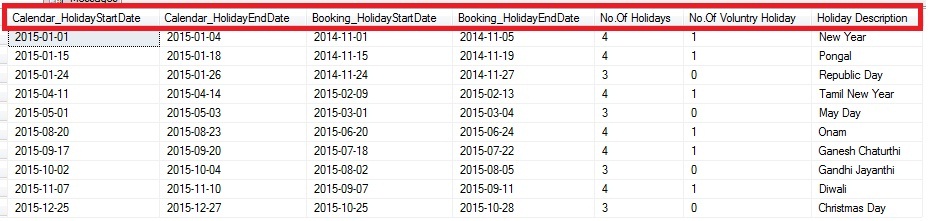
The below screenshot is a sample output of the Script:

Train_Calendar

Script:

Declare @LeaveCalendar as Table (Calendar_Date Date,Train_Date Date,WeekName Varchar(10), Is_NationalHoliday Bit,Is_LocalHoliday Bit, Holiday_Description Varchar(100))

Declare @CalendarYear char(4) = '2015'
Declare @BookingPeriod int = 60 --No.Of days prior the ticket needs to be booked.

;With cteCalendar
as
(
 Select DATEADD(yy, DATEDIFF(yy,0,@CalendarYear + '-01-01'), 0) CalendarDate
 Union All
 Select DATEADD(day,1,Calendardate) CalendarDate From cteCalendar
 Where CalendarDate < DATEADD(yy, DATEDIFF(yy,0,@CalendarYear + '-01-01') + 1, -1)
)
Insert into @LeaveCalendar(Calendar_Date,Train_Date,WeekName)
Select CalendarDate,DATEADD(day,-(@BookingPeriod),CalendarDate),DATENAME(WEEKDAY,CalendarDate) From cteCalendar OPTION(MAXRECURSION 366)

--Saturday and Sunday List Holiday update
Update @LeaveCalendar Set Is_NationalHoliday = 1, Holiday_Description = WeekName
Where WeekName in ('Sunday','Saturday')

--National Holiday List
;with cte(sDate,sDescription) as 
(
 Select @CalendarYear+'-01-01' ,'New Year' 
 Union All
 Select @CalendarYear+'-01-26' ,'Republic Day'
 Union All
 Select @CalendarYear+'-05-01' ,'May Day'
 Union All
 Select @CalendarYear+'-10-02' ,'Gandhi Jayanthi'
 Union All
 Select @CalendarYear+'-12-25' ,'Christmas Day'
)
Update A Set Is_NationalHoliday = 1,Holiday_Description = B.sDescription 
From @LeaveCalendar A
Inner join cte B On A.Calendar_Date = B.sDate 

--LocalHoliday List(The below is a sample, you may add your local holidays in the list)
;with cte(sDate,sDescription) as 
(
 Select @CalendarYear+'-01-15' ,'Pongal' 
 Union All
 Select @CalendarYear+'-04-14' ,'Tamil New Year' 
 Union All
 Select @CalendarYear+'-08-20' ,'Onam' 
 Union All
 Select @CalendarYear+'-09-17' ,'Ganesh Chaturthi'
 Union All
 Select @CalendarYear+'-10-21' ,'Ayudha Puja'
 Union All
 Select @CalendarYear+'-11-10' ,'Diwali'

)
Update A Set Is_LocalHoliday = 1,Holiday_Description = B.sDescription 
From @LeaveCalendar A
Inner join cte B On A.Calendar_Date = B.sDate 

;With cte as
(
Select *,Coalesce(Is_NationalHoliday,Is_LocalHoliday) IsHoliday From @LeaveCalendar
)
,cteHolidayPeriod as
(
 Select *,Coalesce(IsHoliday,Case when Lead(IsHoliday,1)Over(Order by Calendar_date) = Lag(IsHoliday,1)Over(Order by Calendar_Date) 
 and Lag(IsHoliday,1)Over(Order by Calendar_Date) =1 Then 1 
 Else 0 End) as 'Holiday_Period_Voluntry',
 Case when Lead(IsHoliday,1)Over(Order by Calendar_date) = Lag(IsHoliday,1)Over(Order by Calendar_Date) 
 and Lag(IsHoliday,1)Over(Order by Calendar_Date) =1 and IsNull(IsHoliday,0) = 0 Then 1 
 Else NULL End Is_VoluntryHoliday
 From cte
)
,cteReadable as
(
 Select 
 *,datediff(day, '19000101', Calendar_Date) - ROW_NUMBER() OVER (order by Calendar_date) as GroupID 
 From cteHolidayPeriod Where Holiday_Period_Voluntry=1
)
Select *,
(Select Top 1 Holiday_Description From @LeaveCalendar Where Calendar_Date between Calendar_HolidayStartDate and Calendar_HolidayEndDate
 and 1 in (Is_LocalHoliday,Is_NationalHoliday) and Weekname not in ('Saturday','Sunday')) 'Holiday Description'
From(
Select 
 Min(Calendar_date) Calendar_HolidayStartDate,Max(Calendar_date) Calendar_HolidayEndDate,
 DateAdd(day,-1,Min(Train_Date)) Booking_HolidayStartDate,Max(Train_Date) Booking_HolidayEndDate,
 Count(Calendar_Date) 'No.Of Holidays', Count(Is_VoluntryHoliday) 'No.Of Voluntry Holiday'
From cteReadable
Group by GroupID having Count(Calendar_Date)>2)A