Tag: SQL Server

Could not load assembly ‘Microsoft.SqlServer.Connectioninfo, Version=10.0.0.0, Culture=netural, PublicKeyToken=89845dcd8080cc91’ or one Of its dependencies. The system cannot find the file specified.

Problem Statement:

When trying to migrate SQL Server 2008 R2 to SQL Server 2016, we identified an issue with the following error:

Could not load assembly ‘Microsoft.SqlServer.Connectioninfo, Version=10.0.0.0, Culture=netural, PublicKeyToken=89845dcd8080cc91’ or one
Of its dependencies. The system cannot find the file specified.

As a knee jerk reaction, we initially thought it was an issue with SQL Server 2016 installation and need to install the Feature Pack for SQL Server 2016. Once applied the feature Pack, we again tested and found the same issue unfortunately(but really fortunate one!!!).

Analyzing further(I mean, reading the error message clearly, It is found the version 10.0.0 that represents Microsoft® SQL Server® 2008.
As we do not have SQL Server 2008 installed in the environment and the code(.NET application) has some reference to the version mentioned, this was not able to find the dlls in the specified path(C:\windows\assemblies\).

To proceed with our testing, we installed SQL Server 2008 R2 Feature pack and resumed our testing. Finally, it worked like a treat!!!

The learning is we always need to go to the facts(error message) than blindly presume things!!!

please find the below information for various version feature pack references:

Microsoft® SQL Server® 2016 Feature Pack (Version: 13.0.1601.0)
https://www.microsoft.com/en-us/download/details.aspx?id=52676
Microsoft® SQL Server® 2014 SP2 Feature Pack (Version: 12.0.5000.0)
https://www.microsoft.com/en-us/download/details.aspx?id=53164
Microsoft® SQL Server® 2014 Feature Pack (Version: 12.0.0.0)
http://www.microsoft.com/en-us/download/details.aspx?id=42295
Microsoft® SQL Server® 2012 SP1 Feature Pack (Version: 11.0.0.0)
http://www.microsoft.com/en-us/download/details.aspx?id=35580
Microsoft® SQL Server® 2012 Feature Pack (Version: 11.0.2100.60)
https://www.microsoft.com/en-us/download/details.aspx?id=29065
Microsoft® SQL Server® 2008 R2 SP2 Feature Pack (Version: 10.50.4000.0)
https://www.microsoft.com/en-us/download/details.aspx?id=30440
Microsoft® SQL Server® 2008 R2 SP1 Feature Pack (Version: 10.50.2500.0)
http://www.microsoft.com/en-us/download/details.aspx?id=26728
Microsoft® SQL Server® 2008 R2 Feature Pack (Version: 10.50.1600.1)
https://www.microsoft.com/en-us/download/details.aspx?id=16978
Microsoft SQL Server 2008 Service Pack 4 Feature Pack (Version: 10.0.6000.29)
https://www.microsoft.com/en-in/download/details.aspx?id=44277
Microsoft SQL Server 2008 Service Pack 3 Feature Pack (Version: 10.00.5500.00)
https://www.microsoft.com/en-us/download/details.aspx?id=27596
Microsoft SQL Server 2008 Service Pack 2 Feature Pack (Version: 10.00.4000.00)
https://www.microsoft.com/en-us/download/details.aspx?id=6375
SQL Server 2008 Service Pack 1 (Version: 10.00.2531.00)
https://www.microsoft.com/en-in/download/details.aspx?id=20302

SQL Server – Count table rows for all databases using sp_MSforeachdb and sp_MSforeachtable

This post is inspired from one of other post in SQL Server Geeks by Ahmad Osama.

http://www.sqlservergeeks.com/sql-server-sp_spaceused-returns-wrong-count/

I would like to extend some of my ideas further to get the table count as below. At times, SQL Server developers/DBAs might need to know the table row count for all tables from all databases available on a server. There are various approaches to get the row counts in SQL Server.

Here are few approaches as below:
Approach 1:


DECLARE @TableRowCounts TABLE ([databaseNAme] Varchar(100),[TableName] VARCHAR(128), [RowCount] INT) ;
	INSERT INTO @TableRowCounts ([databaseNAme],[TableName], [RowCount])
	EXEC sp_MSforeachdb 'select ''?'' as database_name,o.name,max(i.rowcnt )
						  From sys.objects o 
						inner join sys.sysindexes i on o.object_id=i.id 
						where o.type=''U'' 
						group by o.name' ;
						
Select * From @TableRowCounts

For Partition tables, the above query can be changed a bit as below:
Transact-SQL


DECLARE @TableRowCounts TABLE ([databaseNAme] Varchar(100),[TableName] VARCHAR(128), [RowCount] INT) ;
	INSERT INTO @TableRowCounts ([databaseNAme],[TableName], [RowCount])
	EXEC sp_MSforeachdb 'SELECT ''?'',TBL.name, SUM(PART.rows) AS rows
						FROM sys.tables TBL
						INNER JOIN sys.partitions PART ON TBL.object_id = PART.object_id
						INNER JOIN sys.indexes IDX ON PART.object_id = IDX.object_id
						AND PART.index_id = IDX.index_id
						WHERE IDX.index_id < 2
						GROUP BY TBL.object_id, TBL.name;' ;
						
Select * From @TableRowCounts

Approach 2:


DECLARE @TableRowCounts TABLE ([databaseNAme] Varchar(100),[TableName] VARCHAR(128), [RowCount] INT) ;
	INSERT INTO @TableRowCounts ([databaseNAme],[TableName], [RowCount])
	
EXEC sp_MSforeachdb 'SELECT ''?'',OBJECT_NAME(object_id), SUM(row_count) AS rows
FROM sys.dm_db_partition_stats
WHERE index_id < 2
GROUP BY OBJECT_NAME(object_id)' ;

Select * From @TableRowCounts

Likewise, there are still more ways to get the info in SQL Server. I do not really want to list all the methods, as a simple google search would end up with a lots of scripts for the same. Rather, want to deal about one of major drawbacks with such approaches is it may or may not be accurate in value. If you look at the MSDN articles for each catalogs used in the above approaches, you can see that it clearly suggests based on the approximate values. So if we are looking for an accurate value for tables that are undergoing frequent DELETE/INSERT, then we should really rely on COUNT() function. As COUNT function reads the data, the row count would be more accurate than any other methods.

Here is my attempt to get the count using sp_MSforeachdb and sp_MSforeachtable. I tried to make the script as simple as possible. You may have a look at below:


create Table  TableRowCounts  ([databaseNAme] Varchar(100),[TableName] VARCHAR(128), [RowCount] INT) ;
 
EXEC sp_MSforeachdb
@command1 = 'IF not exists(select 1 where ''?'' in (''master'',''model'',''msdb'',''tempdb''))
				INSERT INTO TableRowCounts ([databaseNAme],[TableName], [RowCount])
				EXEC [?].dbo.sp_MSforeachtable 
				@command1 = ''SELECT ''''?'''',''''&'''',count(1) FROM &'',
					@replacechar = ''&'''

Select * From TableRowCounts
					
Drop Table TableRowCounts
 

Note: You should be very careful as its a very expensive query, you may use at your own risk.Both sp_MSforEachDB and sp_MSforEachtable are undocumented as well.

Hope you enjoyed this post, please share your thoughts on the same.

Query Store in SQL Server 2016 – Overview

QueryStore feature in SQL Server 2016 is very helpful for any SQL Server resource to identify and troubleshoot the performance issues in SQL Server. This feature enables to store the query information along with query plan. The query execution statistics also collected associated with each query.

Applies to: SQL Server 2016 and later

Why do we need QueryStore feature or How does it help?

Yes, we do have an option to analyse the query execution before Querystore using Cachedplan in earlier versions. However, the downside is Cached plan will be saved in memory and it will not be available once SQL Server has been restarted. This was always a challenge for DBA/performance engineer to identify issues with Query execution.

QueryStore actually stores plan and other information in memory initially and as per the configuration it writes to disk.So, even SQL Server gets restarted, the information can be collected from the disk(those written in the disk).

Let us see the plan of the query to understand in detail.
In the plan we can see there are objects like – plan_persist_* (to read the data from disk) and QUERY_STORE_*_IN_MEM (to read data from memory)
*- denotes different objects like query/plan/runtime_stats etc…

To understand simply, let us look at the plan for a simple dmv: Sys.query_store_query

qs_plan

What do we need to configure for Querystore?

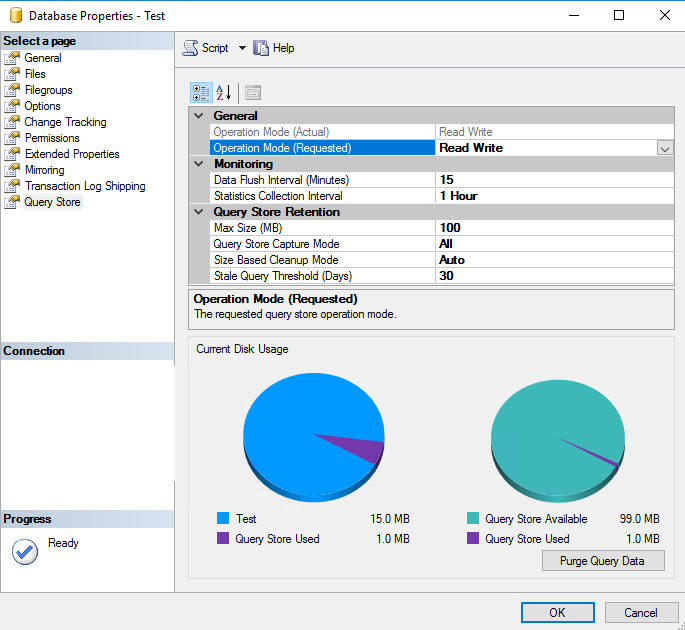
qs_properties

General ->
Operation Mode(Actual) – This is disabled by default to represent the Actual mode of Operation.

Operation Mode(Requested) – This is to configure the mode of Operations.
Options are OFF – to disable the QueryStore
Read Only – You can ONLY read information from QueryStore
Read Write – You can READ and WRITE information to QueryStore

Monitoring – >
Data Flush Interval(Minutes) – This is to specify how frequent the data needs to write to Disk from memory. As higher the number, there is a risk of losing data(if any restart occurs between the specified vaue), lower the number there is an overhead of writing the information to disk. Default value is 15 minutes.

Statistics Collection Interval – This is to record the information about execution statistics of queries being executed.Default is 1 hour.

Query Store Retention – >
Max ize(MB) – The maximum size in MB that can be allocated to store the information. Default value is 100. Once the size reaches out the specified value, it will NEVER write further, only read is available.

Query Store Capture Mode – This is to determine what needs to be collected.
Options are All – (default) which collects all query information
Auto – Collects only the relevant queries, filters out the insignificant queries.However, there is no external influence on identifying the significance, its completely an internal process.
None – No collection of information

Size Based Cleanup Mode – Auto – (Default if QueryStore is enabled.)This will cleanup old and least expensive queries from QueryStore as per the size specified.
Off – No automatic cleanup

Stale Query Threshold(Days) – Number days the Query information stays for. By enabling the QueryStore, the default value sets as 30 days.

Where do we get the information from QueryStore?

Microsoft has provided a good number of DMVs to get the QueryStore information.
Sys.database_query_store_options
Sys.query_store_query
Sys.query_store_query_text
Sys.query_context_settings
Sys.query_store_plan
Sys.query_store_runtime_stats
Sys.query_store_runtime_stats_interval

The above DMVs provide enough information about Query execution statistics for you to troubleshoot your query performances.

How to purge the querystore information?
You can always purge the querystore information using wizard “Purge Query Data” in the Database Properties – > Query Store or by using the below T-SQL:

ALTER DATABASE [Test] SET QUERY_STORE CLEAR ALL

How to identify Primary and foreign key column information in SQL Server

Here is a small script to get information about the Primary Key column(s) and Foreign Key column(s) in SQL Server.

Script:


;WITH GETINFO AS
(
	SELECT	DBNAME = CONVERT(SYSNAME,DB_NAME()), 
				OWNERNAME = CONVERT(SYSNAME,SCHEMA_NAME(OBJ1.SCHEMA_ID)), 
				[PRIMARYTABLE NAME] = CONVERT(SYSNAME,OBJ1.NAME), 
				PKCOLUMN_NAME = CONVERT(SYSNAME,COL1.NAME), 
				[FOREIGNTABLE NAME]= CONVERT(SYSNAME,OBJ2.NAME), 
				FKCOLUMN_NAME = CONVERT(SYSNAME,COL2.NAME), 
				ORDINALPOSITION             = ISNULL(CONVERT(SMALLINT,FKCOL.CONSTRAINT_COLUMN_ID),0),
				[FOREIGNKEY NAME] = CONVERT(SYSNAME,OBJECT_NAME(FK.OBJECT_ID)), 
				[PRIMARYKEY NAME] = CONVERT(SYSNAME,I.NAME)
	FROM   SYS.ALL_OBJECTS OBJ1, SYS.ALL_OBJECTS OBJ2, SYS.ALL_COLUMNS COL1, SYS.ALL_COLUMNS COL2, SYS.FOREIGN_KEYS FK 
	INNER JOIN SYS.FOREIGN_KEY_COLUMNS FKCOL ON (FKCOL.CONSTRAINT_OBJECT_ID = FK.OBJECT_ID) 
	INNER JOIN SYS.INDEXES I  ON (FK.REFERENCED_OBJECT_ID = I.OBJECT_ID AND FK.KEY_INDEX_ID = I.INDEX_ID) 
	WHERE  OBJ1.OBJECT_ID = FK.REFERENCED_OBJECT_ID AND OBJ2.OBJECT_ID = FK.PARENT_OBJECT_ID 
				AND COL1.OBJECT_ID = FK.REFERENCED_OBJECT_ID AND COL2.OBJECT_ID = FK.PARENT_OBJECT_ID 
				AND COL1.COLUMN_ID = FKCOL.REFERENCED_COLUMN_ID AND COL2.COLUMN_ID = FKCOL.PARENT_COLUMN_ID
),SHOWINFO AS
(
	SELECT DISTINCT DBNAME,OWNERNAME,[PRIMARYTABLE NAME],[FOREIGNTABLE NAME],
           PRIMARYKEYCOLUMNNAMES=  REPLACE( 
			   (SELECT A.PKCOLUMN_NAME AS [data()]
				FROM GETINFO A
				WHERE A.[PRIMARYTABLE NAME] = B.[PRIMARYTABLE NAME] AND A.[FOREIGNKEY NAME] = B.[FOREIGNKEY NAME] AND A.[PRIMARYKEY NAME] = B.[PRIMARYKEY NAME]
				ORDER BY A.ORDINALPOSITION FOR XML PATH ('') ), ' ', ',') ,
           FOREIGNKEYCOLUMNNAMES=  REPLACE( 
			   (SELECT A.FKCOLUMN_NAME AS [data()]
                FROM GETINFO A
                WHERE A.[PRIMARYTABLE NAME] = B.[PRIMARYTABLE NAME] AND A.[FOREIGNKEY NAME] = B.[FOREIGNKEY NAME] AND A.[PRIMARYKEY NAME] = B.[PRIMARYKEY NAME]
                ORDER BY A.ORDINALPOSITION FOR XML PATH ('') ), ' ', ',') 
	FROM GETINFO B 
)SELECT * FROM SHOWINFO