Author: Latheesh NK

Warning Message in SQL Server: “Database name ‘tempdb’ ignored, referencing object in tempdb.”

Today, let us quickly try to understand an error message as below.

“Database name ‘tempdb’ ignored, referencing object in tempdb.”.

Many of us would have got this message (I do prefer to call this as a warning message, not error message), however, we would not have noticed as it is not causing any fatal results. With this post, I would like to share my thoughts and like to have your views on this as well.

Let us first see when would you get this message?

use tempdb
GO
create Table #Temp_Table(Col1 int)
GO
Select * From tempdb..#Temp_Table

Now, interesting thing, when the query is changed a bit as below, the message is vanished.

Somehow, I was not convinced the above method as a solution, because that was actually against my understanding of 4 part naming convention (servername.databasename.schemaname.objectname). So, we further tried to test with few more combinations to understand how it works internally.

A simple query as below showed #Temp_Table is created with dbo schema.

As next step, tried to create a schema and a new object is created. If you look at the schema of the object, we can clearly see that it is associated with dbo schema not the new schema. That means, the objects created in tempdb database is always creating in dbo, not in any other schema. In fact, the schema part is actually ignoring for temp tables.

create schema testschema
GO
create Table testschema.#Temp_Table10(Col1 int)

Points to ponder

There is NO need of specifying schema for objects created in tempdb database.

Even we specify a schema name, SQL Server simply ignores the schema part.

If you enjoyed this blog post, please share it with your friends!
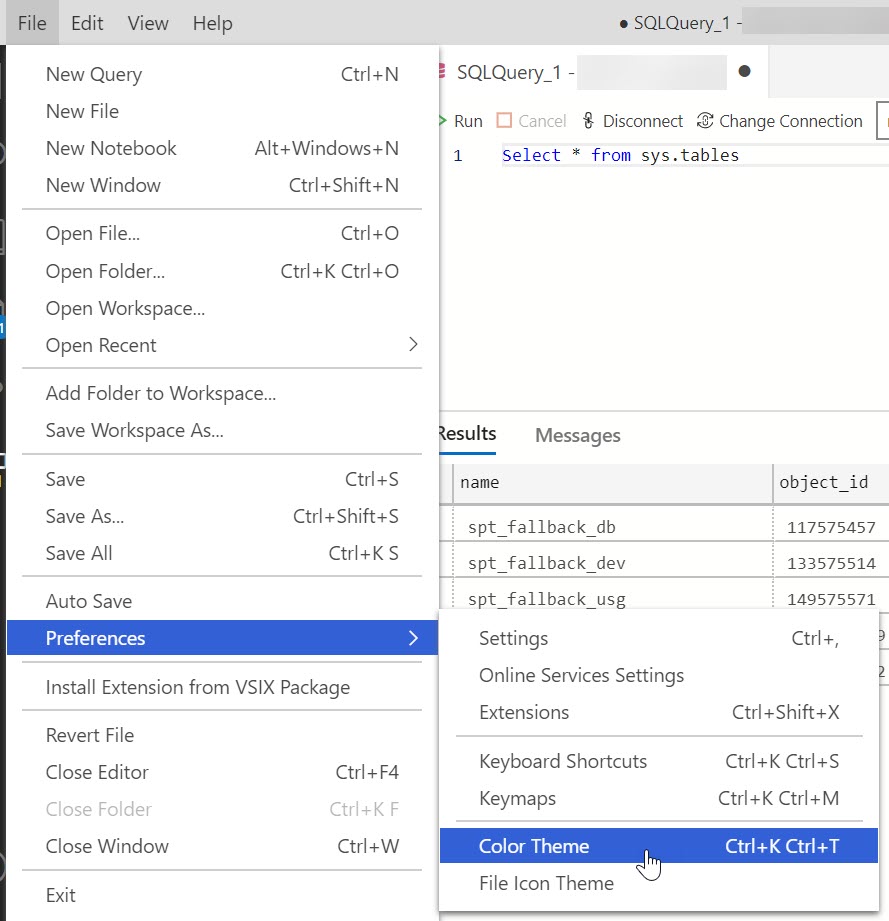
Dark Theme in Azure Data Studio (ADS)

I always prefer Dark Theme possibly for almost all cases. This post simply explains the way to make ADS to a Dark theme mode.

Method 1: From File Menu and set the color theme.

Method 2: From “Settings” icon and set the color theme.

Step1: Go to “File” Menu and click on “Preferences” and select “Color Theme

Once the color theme is selected, we will be able to select the theme “Dark Azure Data Studio“.

See Also:

Dark Theme in SSMS

I’d like to grow my readership. If you enjoyed this blog post, please share it with your friends!

Raga: Vasantha

Introduction

Raga: Vasantha

Type: Janya raga of 17th melakartha Surykantham

Rendering of Arohana & Avarohana: https://www.youtube.com/watch?v=KYl2VnSKGFs

Vocal References

Dr. Vidwan UmaShankar

Neyveli R Santhanagopalan

Instrumental References

Shri Kamakshi Katakshi – Violin

Dr. L Subramaniam

Film Song References

Malayalam

Olakkuda Choodunnura

Sundari Sundari

Kanimalaray

Goruvayoor unnikannanu

Kathoram Kinnoram

Tamil

Vasantha ruthu

Andhimazhai Pozhigirathu

Minasara Poove

Idhayam

COUNT and COUNT_BIG functions in SQL Server

Todays post, we will quickly see the two important functions count and count_big in SQL Server. Both functions return the number of records in a table. There are lots of interesting facts with count function and we will try to cover most of things, if you have any more points, feel free to share your thoughts as a comment.

Return types of count and count_big

As mentioned earlier, these two functions returns the number of records, however these two differ in return datatype, COUNT_BIG always returns a bigint data type value. COUNT always returns an int data type value.

Let us quickly see with a system procedure (sp_describe_first_result_set) to understand the return datatype as below:

Count and column name and non column name as parameter

The parameter value makes the difference on column name and non column name expression of the table involved. The below screen shot explains you the evaluation on the column name while we provide a valid column name as parameter otherwise, irrespective of the expression value, it just do not evaluate.

As a simple example, Select 1/0 always produces an error in SQL Server, but 1/0 as a parameter to count or count_big function does not evaluate it.

Count and NULL values in table

This is another interesting point to be aware in SQL Server NULL value column in a table plays a big role with count functions. If the parameter to a count function is a column name and the column is a nullable one, it is extremely important to be noted the NULL values will not be considered to count function.

See Also:

https://blog.sqlauthority.com/2010/09/21/sql-server-count-not-allowed-but-count_big-allowed-limitation-of-the-view-5/

Hope you enjoyed this blog post, please share it with your friends!