Author: Latheesh NK

How do we cleanup plan cache in SQL Server?

At times, we may need to cleanup plan cache in SQL Server. I have come across situations where I need to flush the plans from the cache for our testing purposes
to troubleshoot performance issues related to procedure/test environment.However, there is caution for this to use at production boxes as it may hurt the performance badly.

There are three ways to clean up plan cache as per our requirement.

1. DBCC FREEPROCCACHE

– This DBCC command will clear/clean the entire cached plans from the SQL Server for the instance
– I personally used for my test environment to clean up the entire plan before do a load test and followed by a single user test execution(this to generate fresh plan without affecting the actual load test)


--Clean up the entire plans for the instance
DBCC FREEPROCCACHE with NO_INFOMSGS
GO
--Check the count of the plans
Select dbid,db_name(dbid),count(1) From sys.dm_exec_cached_plans dec
CROSS APPLY sys.dm_exec_sql_text(dec.plan_handle) AS des
where db_name(dbid) in ('Nov_ProdStats','Dec_ProdStats') --Sample Databases for the demonstration
Group by db_name(dbid), dbid


2. DBCC FLUSHPROCINDB

– This DBCC command will flush the plans for a database
– Database id is a mandatory parameter for FLUSHPROCINDB execution
– This way we will make sure the clean up will not have any impact on other databases


--Clean up the plans for a database 
DBCC FLUSHPROCINDB (8) -- 8 is the databaseid of Dec_ProdStats
GO
--Check the count of the plans
Select dbid,db_name(dbid),count(1) From sys.dm_exec_cached_plans dec
CROSS APPLY sys.dm_exec_sql_text(dec.plan_handle) AS des
where db_name(dbid) in ('Nov_ProdStats','Dec_ProdStats') --Sample Databases for the demonstration
Group by db_name(dbid), dbid


3. DBCC FREEPROCCACHE with plan handle as parameter

– This is to clean up the cache only for the plan handle supplied

	
--Identify the plan handle
SELECT cp.plan_handle, st.[text],*
FROM sys.dm_exec_cached_plans AS cp 
CROSS APPLY sys.dm_exec_sql_text(plan_handle) AS st
WHERE object_name(objectid)='test'--test is a sample procedure name
GO
--Clean up the plan for TEST procedure
DBCC FREEPROCCACHE(0x05000C001B67A4684061C3B9010000000000000000000000)
GO
--Check the count of the plans
Select dbid,db_name(dbid),count(1) From sys.dm_exec_cached_plans dec
CROSS APPLY sys.dm_exec_sql_text(dec.plan_handle) AS des
where db_name(dbid) in ('Nov_ProdStats','Dec_ProdStats') --Sample Databases for the demonstration
Group by db_name(dbid), dbid

Hope you enjoyed this one, see you soon with another one. Meanwhile you can share any feedback or your thoughts here.

Query Store in SQL Server 2016 – Overview

QueryStore feature in SQL Server 2016 is very helpful for any SQL Server resource to identify and troubleshoot the performance issues in SQL Server. This feature enables to store the query information along with query plan. The query execution statistics also collected associated with each query.

Applies to: SQL Server 2016 and later

Why do we need QueryStore feature or How does it help?

Yes, we do have an option to analyse the query execution before Querystore using Cachedplan in earlier versions. However, the downside is Cached plan will be saved in memory and it will not be available once SQL Server has been restarted. This was always a challenge for DBA/performance engineer to identify issues with Query execution.

QueryStore actually stores plan and other information in memory initially and as per the configuration it writes to disk.So, even SQL Server gets restarted, the information can be collected from the disk(those written in the disk).

Let us see the plan of the query to understand in detail.
In the plan we can see there are objects like – plan_persist_* (to read the data from disk) and QUERY_STORE_*_IN_MEM (to read data from memory)
*- denotes different objects like query/plan/runtime_stats etc…

To understand simply, let us look at the plan for a simple dmv: Sys.query_store_query

qs_plan

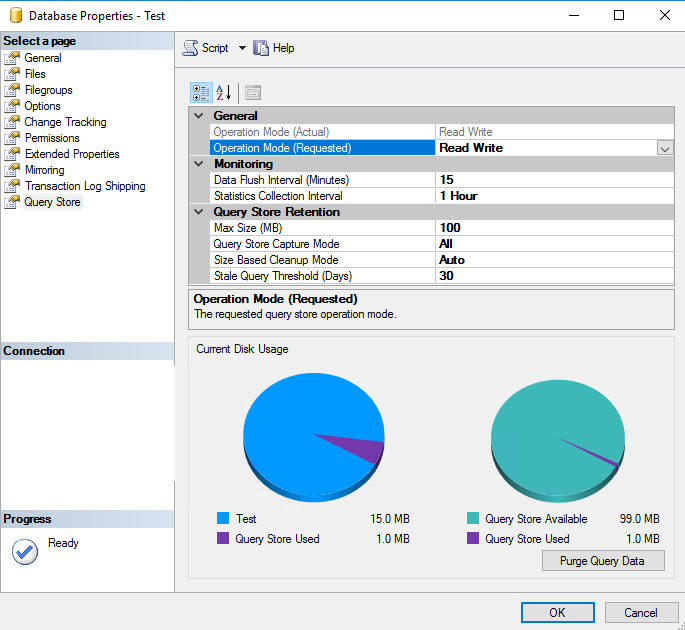
What do we need to configure for Querystore?

qs_properties

General ->
Operation Mode(Actual) – This is disabled by default to represent the Actual mode of Operation.

Operation Mode(Requested) – This is to configure the mode of Operations.
Options are OFF – to disable the QueryStore
Read Only – You can ONLY read information from QueryStore
Read Write – You can READ and WRITE information to QueryStore

Monitoring – >
Data Flush Interval(Minutes) – This is to specify how frequent the data needs to write to Disk from memory. As higher the number, there is a risk of losing data(if any restart occurs between the specified vaue), lower the number there is an overhead of writing the information to disk. Default value is 15 minutes.

Statistics Collection Interval – This is to record the information about execution statistics of queries being executed.Default is 1 hour.

Query Store Retention – >
Max ize(MB) – The maximum size in MB that can be allocated to store the information. Default value is 100. Once the size reaches out the specified value, it will NEVER write further, only read is available.

Query Store Capture Mode – This is to determine what needs to be collected.
Options are All – (default) which collects all query information
Auto – Collects only the relevant queries, filters out the insignificant queries.However, there is no external influence on identifying the significance, its completely an internal process.
None – No collection of information

Size Based Cleanup Mode – Auto – (Default if QueryStore is enabled.)This will cleanup old and least expensive queries from QueryStore as per the size specified.
Off – No automatic cleanup

Stale Query Threshold(Days) – Number days the Query information stays for. By enabling the QueryStore, the default value sets as 30 days.

Where do we get the information from QueryStore?

Microsoft has provided a good number of DMVs to get the QueryStore information.
Sys.database_query_store_options
Sys.query_store_query
Sys.query_store_query_text
Sys.query_context_settings
Sys.query_store_plan
Sys.query_store_runtime_stats
Sys.query_store_runtime_stats_interval

The above DMVs provide enough information about Query execution statistics for you to troubleshoot your query performances.

How to purge the querystore information?
You can always purge the querystore information using wizard “Purge Query Data” in the Database Properties – > Query Store or by using the below T-SQL:

ALTER DATABASE [Test] SET QUERY_STORE CLEAR ALL

DROP IF EXISTS – A handy feature in SQL Server 2016

Microsoft has introduced a handy cool feature in SQL Server 2016 called DROP IF EXISTS for objects.

Applies to : SQL Server 2016 and later
This is applicable for dropping an object with existence check. In early versions, we need to write the existence condition and then drop the objects. For an example, if we need to drop a table, we would write code as follows:

Create Table dbo.ExistsCheck(Col1 int) 

--Code to check the existence and drop the object 
If exists (Select 1 From sys.tables where name='dbo.ExistsCheck') 
    Drop table dbo.ExistsCheck

Let us look at the execution plan and the statistics information for the below:

ifexists_old

SQL Server 2016 and later version has a new way to do as follows:

--Syntax
DORP OBJECT_TYPE [ IF EXISTS ] OBJECT_NAME

/*Object_type can be anything like Table, Procedure, View, Function, Database, Trigger, Assembly(not supported in AZURE), Sequence, Index, Role, user, type, synonym, column.*/
--Eg:
Drop table If exists dbo.ExistsCheck

Using the above syntax, it is interested to note that no execution plan and no statistics generated as those are trivial operations.

ifexists_new
/*It is to be noted that the column drop if exists syntax is different*/
ALTER TABLE tbl_verify DROP column IF EXISTS bbbb

/*Similar way is also applicable for dropping constraints as well*/
ALTER TABLE tbl_verify DROP Constraint IF EXISTS PK__tbl_veri__4EE7470B21966CBA

I personally feel this is a nice feature we can adopt in new development activities(caveat: only for SQL Server 2016 and later versions).

If you enjoyed this blog post, feel free to share it with your friends!