Author: Latheesh NK

Few use cases of splitting strings in SQL Server

Its a very frequent question in forums on splitting strings with various forms of data. This blog post will try to get few of use cases and provide solutions to those scenarios in a simpler way.

Case 1: Split a full name to first name & last name

This case is a very common one scenario, a full name in a column needs to be split into two as First Name and Last Name.

-- DDL and sample data population, start
 DECLARE @tbl TABLE (ID INT IDENTITY PRIMARY KEY,  FullName varchar(200));
 INSERT INTO @tbl (FullName) VALUES
 ('Vigneshwaran Arunachalam'), 
 ('Murugan Mani'), 
 ('Dharani Kumar Rajput'), 
 ('Uday Talluri'), 
 ('Soundarya Lakshmi'), 
 ('Noname'), 
 ('Latheesh Nedumpurath Kalappurakkal');
 

 -- DDL and sample data population, end
 DECLARE @separator CHAR(1) = SPACE(1);
    
 ;WITH rs AS
 (
  SELECT * 
  , TRY_CAST('<root><r>' + 
  REPLACE(FullName, @separator, '</r><r>') + 
  '</r></root>' AS XML) AS xmldata
  FROM @tbl
 )
 SELECT ID, rs.FullName 
  , rs.xmldata.value('(/root/r[1]/text())[1]', 'VARCHAR(30)') AS firstName
  , rs.xmldata.query('data(/root/r[position() gt 1]/text())').value('.' , 'VARCHAR(100)') AS lastName
 FROM rs;

Result

Case 2: Multi split a string to columns

This is a multi split scenario, where you would like to divide your single string into multiple columns according to the key name in the string. if there are no key then it has to consider NULL value while preparing in a tabular format.

-- DDL and sample data population, start
 DECLARE @tbl table (ID int, Comments VARCHAR(500));
 INSERT INTO @tbl VALUES 
 (1, 'StartDate: 01/01/2000 || EndDate: 01/31/2001 || Position: Manager || Salary: 100K || Age:50 || IsActive: No'),
 (2, 'StartDate: 01/01/2002 || Position: Sr.Manager || Salary: 150K || Age:55 || IsActive: Yes'),
 (3, 'StartDate: 01/01/2001 || Position: Director || Age:55');
 -- DDL and sample data population, end
    
 ;WITH rs AS
 (
  SELECT * 
  , '[{"' + REPLACE(REPLACE(REPLACE(Comments
  , ':', '":"')
  , SPACE(1), '')
  , '||', '","') + '"}]' AS jsondata
  FROM @tbl
 )
 SELECT rs.ID, rs.comments, report.*
 FROM rs
  CROSS APPLY OPENJSON(jsondata)
 WITH 
 (
     [StartDate] VARCHAR(10) '$.StartDate'
     , [EndDate] VARCHAR(10) '$.EndDate'
     , [Position] VARCHAR(30) '$.Position'
     , [Salary] VARCHAR(10) '$.Salary'
     , [Age] INT '$.Age'
     , [IsActive] VARCHAR(3) '$.IsActive'
 ) AS report;

Result

I will be adding more cases as I come across in future. I would like to request you to share your thoughts on any alternatives and any new use cases you would like to add to this list.

See Also:

String_Split function in SQL Server 2016

If you enjoyed this blog post, feel free to share it with your friends!

@@ERROR & @@TOTAL_ERRORS in SQL Server

@@ERROR

This variable is used for a basic error handling mechanism in SQL Server earlier days (before SQL 2005). This variable is used to capture the error code of an immediate previous statement if any. If there is an error, it will return the error code else 0. It is to be noted that any statement will reset the value including the same statement. So ideally, If you want to capture for a longer scope, the immediate @@ERROR code can be assigned to a variable.

Let us quickly look at a simple example as below.

Select 1/0
Select @@ERROR, @@TOTAL_ERRORS

In the above code, the first statement is throwing the below error.

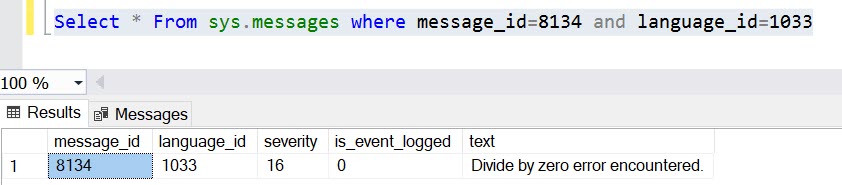
Msg 8134, Level 16, State 1, Line 1
Divide by zero error encountered.

And the first @@ERROR statement will capture the error code, where as while executing the second @@ERROR, the value is rest to 0.

Once you captured the error code, we can verify the message it later from sys.messages system table as well.

@@TOTAL_ERRORS

This variable sounds similar to the above one, however, this has no relation with @@ERROR. This variable returns the number of disk write errors encountered by SQL Server since SQL Server last started/restarted.

I could not see lots of use cases if this variable. If you come across and already experienced, please feel free share those information as a comment.

If you enjoyed this blog post, please feel free to share it with your friends!
@@CONNECTIONS & @@MAX_CONNECTIONS in SQL Server

@@CONNECTIONS

It returns the total number of connections that includes both successful and failed made to SQL Server since it is started or restarted. Honestly, I have not used this variable anywhere and still could not really able to figure out a use case as well. Readers can share your thoughts if there are any.

@@MAX_CONNECTIONS

It returns the maximum number of simultaneous connections allowed to a SQL Server. Maximum user connections allowed by SQL Server by default is 32,767.

If you enjoyed this blog post, please share it with your friends!

How to script out ALL or FEW SQL Server Jobs using SSMS

Today, I have come across a requirement to generate the sql script for SQL Server Jobs (only few out of thousands). Most of us are familiar with an approach by right click on the sql job and choose ‘Script Job as’ to script out individually, but this is such a tedious job if you have couple of sql jobs to be scripted.

This post explains another simpler way using “Object Explorer Details“. It allows you to select multiple jobs to be scripted as below.

  1. Choose Object Explorer Details Menu from View main menu in SSMS.
  2. Select “SQL Server Agent” -> “Jobs” in Object explorer which lists all the SQL Agent Jobs in Details.
  3. Select the jobs (ALL or FEW) you want to script and then right click to select the scripting option.

The above steps will create all the selected jobs in a single query window as per the selection.

If you enjoyed this blog post, please feel free to share it with your friends!

CONCAT_WS in SQL Server

CONCAT_WS is a new function introduced from SQL Server 2017. CONCAT_WS denotes concatenate the strings with a separator. The syntax of CONCAT_WS is as below:

CONCAT_WS(separator,string1,string2.....stringN)

Prior to SQL Server 2017, we will have to use “+” operator to concatenate and carefully place the separator, that really adds lots of frustration to any developer (At least, I hate this in my initial coding days). CONCAT_WS is really a good winner in such use cases. In one of my use case, we wanted to send data from one table to external system, which works on BizTalk, as a pipe separated text file format. Earlier, we had to use carefully do lots of checks at bot SQL Server and BizTalk sides to avoid data issues like NULL handling etc. This function reduces a lots of work in such cases.

Few Points to be considered:

  1. This function skips NULL value. That means we will have to explicitly handle NULL value columns if the column needs to be considered in the output.
  2. The maximum number of parameters allowed is 254.
  3. This function implicitly converts all arguments to string type before concatenation.
  4. This function requires minimum a separator parameter and at least other two string parameters.